
Table of Contents
Introduction
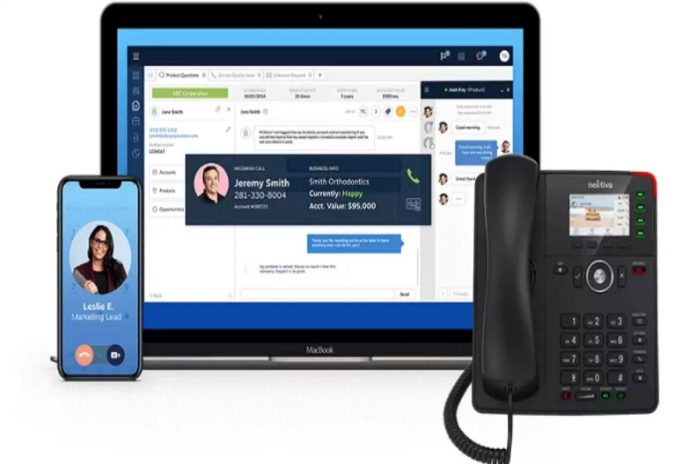
A VoIP (Voice over Internet Protocol) business phone system transmits voice calls and multimedia over the internet instead of traditional copper telephone lines. Unlike legacy PBX systems, VoIP offers enterprise-grade features at a fraction of the cost, with greater flexibility for remote work, scalability, and integration with other business tools. Modern VoIP systems convert analog voice signals into digital data packets, enabling users to call from desk phones, softphones (apps on computers or mobiles), or web browsers.
4 Features to Look For in a VoIP Business Phone System
| Feature | Why It Matters |
|---|---|
| Unified Communications (UC) Integration | Seamlessly combine voice, video, chat, email, and file sharing in one platform (e.g., Microsoft Teams integration). Reduces app switching. |
| Auto Attendant & IVR | Automated call routing (“Press 1 for Sales…”) improves customer experience and reduces receptionist workload. Essential for professional image. |
| Mobile & Desktop Softphone Apps | Allows employees to make/receive business calls from their personal devices using their work extension. Critical for hybrid/remote teams. |
| Advanced Call Analytics & Reporting | Tracks call volume, wait times, abandonment rates, and agent performance. Helps optimize staffing and training decisions. |
25+ VoIP Features and Benefits for All Businesses
| Feature | Benefit |
|---|---|
| Auto Attendant | 24/7 professional call routing without a live operator |
| Call Forwarding | Never miss calls — route to mobile, home, or alternate desk |
| Call Recording | Compliance, training, and dispute resolution |
| Voicemail to Email | Receive voicemail as audio file in inbox; faster response |
| Call Queuing | Places callers in line with estimated wait time; reduces hang-ups |
| Caller ID | Recognizable outgoing caller ID; improves answer rates |
| Do Not Disturb (DND) | Blocks interruptions during focused work or meetings |
| Ring Groups | Simultaneous or sequential ringing of multiple extensions |
| Call Park | Place call on hold and retrieve from any company phone |
| Conference Calling | Audio/video meetings with screen sharing; no third-party apps |
| Virtual Fax (FoIP) | Send/receive faxes via email; no fax machine needed |
| Extension Dialing | Free internal calls between employees anywhere in the world |
| Call Transfer (Blind/Warm) | Move calls to colleague with or without prior announcement |
| Music on Hold | Customizable hold music or marketing messages |
| CRM Integration | Pop-up customer record on incoming call; click-to-dial |
| Presence Status | See if colleagues are free, busy, or on a call |
| Real-time Call Monitoring | Managers can listen, whisper, or barge into calls |
| International Calling | Low-cost rates to global numbers via internet |
| 3-Way Calling | Instant ad-hoc meetings with external parties |
| Anonymous Call Rejection | Automatically block private/unknown numbers |
| Call Screening | See caller name/num before answering; decide to accept/reject |
| Hot Desking | Log into any desk phone on the network with your extension |
| Voicemail Transcription | Read voicemail as text in email or SMS |
| Failover & Redundancy | Routes calls to backup numbers if internet/power fails |
| API Access | Build custom integrations with your business apps |
| SMS/MMS Support | Send/receive texts from business number |
| Emergency (E911) | Provides dispatcher with physical address of caller |
Choosing the Right VoIP Features
| Business Type | Must-Have Features | Nice-to-Have |
|---|---|---|
| Small Retail Shop | Auto Attendant, Virtual Fax, Mobile App, Basic Call Forwarding | SMS, CRM Integration |
| Call Center (Inbound Support) | Call Queuing, Analytics, Recording, Real-time Monitoring, CRM Integration | IVR, Callback Request |
| Remote-First Agency | Softphone, Presence, Video Conferencing, Hot Desking | Voicemail to Email, API |
| Medical/Legal Practice | HIPAA-compliant VoIP, Call Recording, Voicemail Transcription, E911 | Virtual Fax, Secure Messaging |
| Multi-location Enterprise | Ring Groups, Unified Communications, Hot Desking, International Calling | Failover, Custom Development |
Key insight: Don’t pay for features you won’t use. Start with core needs (auto attendant, mobile app, basic call management) and scale up.
Opt for a Feature-Rich VoIP Phone Service
| Service Provider | Standout Features | Best For |
|---|---|---|
| RingCentral | Full UC (video, SMS, fax, analytics), 300+ integrations | Mid-market to enterprise |
| Nextiva | Exceptional customer support, built-in CRM, survey tools | Service-focused teams |
| 8×8 | Global calling, unlimited international to 48+ countries | Distributed global teams |
| Vonage | AI-driven insights, programmable APIs | Developers & custom builds |
| Grasshopper | Simple mobile app, virtual phone system only | Solopreneurs & very small teams |
| Microsoft Teams Phone | Native integration with Teams ecosystem | Microsoft 365 shops |
| Zoom Phone | Familiar Zoom interface, integrated video meetings | Existing Zoom users |
Pro tip: Most providers offer a free trial (7–30 days). Test call quality, app usability, and support response before committing.
VoIP Pricing Explained: Monthly Costs, Setup Fees & What to Expect
| Cost Component | Typical Range | Notes |
|---|---|---|
| Monthly per user | $15 – $35/user (billed annually) | Basic plans ($15–$20): limited features, standard support. Premium ($25–$35): advanced analytics, integrations, unlimited auto attendants. |
| Setup / Onboarding fee | $0 – $50 per user | Many providers waive for annual contracts. DIY setup free; white-glove service costs extra. |
| Hardware (IP phones) | $50 – $300 one-time | Basic desk phone (Yealink T31P ~$50); advanced color touchscreen ($200+). BYOD often allowed. |
| Porting fee (number transfer) | $0 – $20 per number | Usually free from major carriers; small admin fee possible. |
| Early termination fee | Remaining contract balance | Month-to-month avoids this; 1–3 year contracts lower monthly rate but lock you in. |
| International calling | $0.01 – $0.10 per minute | Or unlimited international add-on ($5–$15/user/month). |
| Additional toll-free minutes | $0.019 – $0.039 per minute | Most plans include 500–3,000 minutes; overage fees apply. |
| Premium support / SLA | $10 – $30/user/month | 24/7 phone support, 99.999% uptime guarantee. |
Hidden costs to watch for: overage fees on metered plans, per-seat minimums (e.g., min 5 users), and third-party integration fees (e.g., Salesforce CTI connector).
Recommended Hardware
| Device Type | Model | Approx. Price | Best For |
|---|---|---|---|
| Entry-level desk phone | Yealink T31P | $50 – $60 | Small offices, basic calling |
| Mid-range desk phone | Poly Edge E300 | $120 – $150 | Color display, Bluetooth, 5-way conferencing |
| Executive desk phone | Yealink T57W | $250 – $300 | Touchscreen, wireless headset support, 16+ lines |
| DECT cordless | Panasonic KX-TGP600 | $200 (base) + $100/handset | Warehouses, medical offices, retail floors |
| Conference speaker | Poly Sync 20 | $130 – $170 | Huddle rooms, remote workers |
| Headsets (wired) | Jabra Evolve 20 | $50 – $70 | Call center agents |
| Headsets (wireless) | Yealink WH62 | $150 – $200 | Heavy daily call volume |
| ATA (analog adapter) | Grandstream HT801 | $40 – $50 | Use existing analog phones or fax machines |
Compatibility: Always check provider’s supported device list before purchasing. Most support standard SIP (Session Initiation Protocol) devices.
Conclusion
A VoIP business phone system is no longer a luxury — it’s a baseline requirement for modern, flexible, and professional communication. The right system reduces telecom costs by 50–75%, empowers remote teams, and provides rich data for customer service improvement. When evaluating options, prioritize reliability (uptime SLA), essential features (auto attendant, mobile app, integrations), and transparent pricing. Start with a month-to-month plan or free trial, test with 5–10 users, and scale as you validate performance. Avoid long-term contracts until you confirm the provider meets your call quality and support needs.
FAQs
1. Is VoIP reliable for business-critical calls?
Yes — with sufficient internet bandwidth (100 Kbps per concurrent call) and QoS (Quality of Service) settings, VoIP matches or exceeds traditional landline reliability. Look for 99.999% uptime SLAs.
2. Can I keep my existing business phone number?
Yes. Most providers offer number porting. Process takes 2–4 weeks for local numbers; toll-free ports are faster.
3. What internet speed do I need for VoIP?
Minimum: 10 Mbps download / 5 Mbps upload for up to 5 concurrent calls. For 10+ users, 25/10 Mbps. Use a wired connection when possible.
4. Does VoIP work during a power outage?
Only if you have backup power (UPS for routers/switches) and failover routing to mobile numbers. Some providers automatically forward to a secondary number.
5. Is VoIP secure from hacking?
Reputable providers use TLS/SRTP encryption, fraud detection, and require strong passwords. Avoid open Wi-Fi without VPN. Disable unused international calling if not needed.
6. Can I use VoIP without a desk phone?
Absolutely. Softphone apps (desktop/mobile) turn your existing devices into fully functional phones. Many modern businesses use softphones exclusively.
7. How does VoIP compare to a traditional landline in cost?
Typical landline: $50–$150 per line/month. VoIP: $15–$35 per user/month with dozens of included features. Long distance and international are drastically cheaper.