
Table of Contents
Introduction
Working with PDF files used to require expensive desktop software. Today, cloud-based PDF editors have changed how students, businesses, freelancers, and professionals manage documents.
The tool that has become popular with this name in this range is Sejda .com due to its combo package of being simple but full of features in editing the PDF document. Users will be able to edit PDFs, merge and split PDF documents, compress PDF files, convert PDF to Word (an editor), and sign PDFs. No complicated software install is required on your PC; Sejda offers an online application and a desktop application.
What is Sejda .com?
Sejda .com is an online and desktop PDF management platform designed to simplify document editing. Instead of focusing only on PDF conversion, it provides more than 30 PDF tools for editing, organizing, compressing, securing, and converting documents.
The platform serves:
- Students
- Teachers
- Office workers
- HR departments
- Lawyers
- Small businesses
- Freelancers
- Remote teams
Unlike many traditional PDF applications, Sejda emphasizes an easy interface suitable for beginners while still providing features that professionals need.
Key Features of Sejda .com
PDF Editing
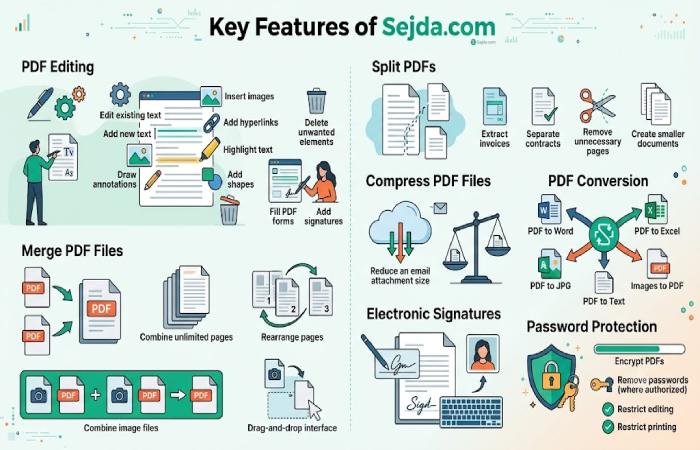
One of Sejda’s strongest capabilities is direct PDF editing.
Users can:
- Edit existing text
- Add new text
- Insert images
- Add hyperlinks
- Highlight text
- Draw annotations
- Add shapes
- Delete unwanted elements
- Fill PDF forms
- Add signatures
Merge PDF Files
Combining multiple PDFs is one of the platform’s most frequently used tools.
Benefits include:
| Feature | Benefit |
| Merge unlimited pages | Better organization |
| Rearrange pages | Custom order |
| Combine images and PDFs | Single document |
| Drag-and-drop interface | Faster workflow |
Split PDFs
Instead of downloading an entire document, users can separate individual pages or chapters.
Common use cases include:
- Extract invoices
- Separate contracts
- Remove unnecessary pages
- Create smaller documents
Compress PDF Files
Large PDFs can slow email attachments and cloud uploads.
Sejda reduces file size while maintaining reasonable image quality.
PDF Conversion
Supported conversions include:
| Convert From | Convert To |
| Word | |
| Excel | |
| JPG | |
| Text | |
| Images |
Electronic Signatures
Users can:
- Draw signatures
- Upload signature images
- Type digital signatures
- Place signatures anywhere on a document
Password Protection
Security tools include:
- Encrypt PDFs
- Remove passwords (where authorized)
- Restrict editing
- Restrict printing
Desktop vs Online Version
| Feature | Online | Desktop |
| Installation | No | Yes |
| Internet Required | Yes | No |
| Browser Based | Yes | No |
| Local Processing | Limited | Yes |
| Large Files | Better with Premium | Better for offline use |
| Privacy | Secure uploads | Files stay on device |
Is Sejda Safe?
Security is one of Sejda’s biggest strengths.
According to the company:
- Files are transferred over encrypted connections.
- Uploaded files are automatically deleted after processing.
- Desktop users can process documents entirely offline, so files never leave their device.
This makes Sejda suitable for many personal and business workflows, though organizations with strict compliance requirements should evaluate their own policies before uploading sensitive documents.
Free Version Limitations
The free version works well for occasional users but includes usage limits.
Typical limits include:
| Limitation | Free Plan |
| Tasks per hour | Limited |
| Maximum file size | Limited |
| Maximum pages | Limited |
| Multiple file processing | Restricted |
For users who work with PDFs daily, upgrading to a paid plan removes many of these restrictions.
Pricing Overview
Although pricing may change over time, Sejda generally offers:
- Free plan
- Web subscription
- Desktop license
- Combined subscription
Premium plans typically remove task limits and unlock higher file sizes and advanced capabilities.
Advantages of Sejda .com
Beginner-Friendly Interface
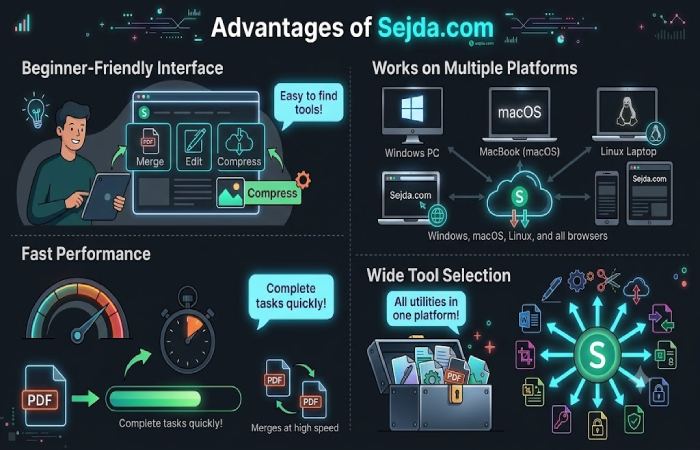
The dashboard is simple, making it easy to find tools without extensive training.
Works on Multiple Platforms
Users can choose between:
- Windows
- macOS
- Linux
- Any modern web browser
Fast Performance
Most common tasks, such as merging, compressing, or converting PDFs, can be completed quickly depending on file size and internet speed.
Wide Tool Selection
Instead of using separate applications, Sejda brings many PDF utilities into one platform.
Limitations
No software is perfect.
Some drawbacks include:
- Free usage restrictions
- Large documents may require a premium plan
- Heavy enterprise workflows may need dedicated PDF software
- Certain advanced editing scenarios can be more limited than specialized desktop editors
Who Should Use Sejda?
Sejda is a good choice for:
Students
- Edit assignments
- Sign forms
- Compress submissions
Teachers
- Annotate PDFs
- Create worksheets
- Merge study materials
Businesses
- Prepare contracts
- Merge reports
- Secure documents
Freelancers
- Edit invoices
- Sign agreements
- Convert client documents
Sejda vs Other PDF Editors
| Feature | Sejda | Adobe Acrobat | Smallpdf | PDF24 |
| Free Version | Yes | Limited | Yes | Yes |
| Online Editor | Yes | Yes | Yes | Partial |
| Desktop App | Yes | Yes | Limited | Yes |
| PDF Conversion | Yes | Yes | Yes | Yes |
| PDF Merge | Yes | Yes | Yes | Yes |
| Digital Signature | Yes | Yes | Yes | Limited |
Independent reviews continue to rank Sejda among the stronger free online PDF editors, especially for light-to-moderate editing and privacy-conscious workflows.
Tips for Using Sejda Efficiently
- Keep documents organized before uploading.
- Compress large PDFs before emailing.
- Use the desktop app for confidential files.
- Merge related documents into one PDF for easier sharing.
- Save edited files with clear version names.
Common Use Cases
People commonly use Sejda for:
- Resume editing
- Contract signing
- Invoice creation
- Academic assignments
- Legal document preparation
- PDF conversion
- File compression
- Page extraction
- Business reports
- Digital document workflows
Frequently Asked Questions
Is Sejda .com free?
Yes. Sejda offers a free plan with daily or hourly usage limits and premium subscriptions for heavier use.
Can I edit existing PDF text?
Yes. Sejda supports editing existing text in many PDF documents, along with adding text, images, links, and annotations.
Does Sejda work offline?
Yes. The desktop application allows offline editing, so files remain on your computer.
Is Sejda available on Mac?
Yes. Sejda Desktop supports Windows, macOS, and Linux.
Does Sejda add watermarks?
For supported tasks within its free limits, Sejda generally does not add watermarks to output files.
Final Verdict
Sejda .com has earned a strong reputation by making PDF editing approachable without sacrificing essential functionality. Combining online convenience with a desktop application, powerful editing capabilities, and a commitment to privacy, it’s a reasonable solution for students, freelancers, and many business users. The free plan limits on file size and number of documents may make it inadequate for some intensive work, but for everyday use, it will likely do. You’ll get to remove limitations with the paid versions.
For anyone looking for an easy-to-use PDF editor that handles editing, conversion, compression, signing, and document organization in one place, Sejda remains one of the most capable options available in 2026.