
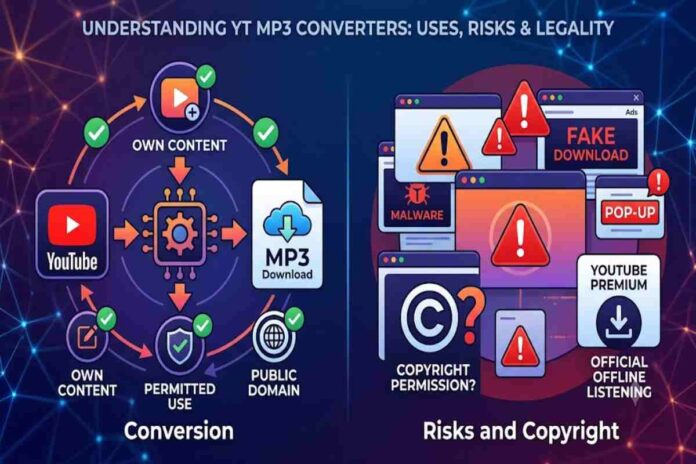
Searching for yt mp3 converter — usually means you want to turn the audio from a YouTube video into an MP3 file. The basic idea sounds simple: paste a video URL, let a service process it, and download an audio file. But the important questions are less about the conversion itself and more about what content you are converting, whether you have the right to download it, and whether the website or software you use is trustworthy.
This difference matters because YouTube content can be copyrighted, and YouTube itself says copyright owners generally control how their creative works are used and distributed.
Table of Contents
What Is a YT MP3 Converter –?
A YT MP3 converter — is a website, application, or software tool designed to extract or convert audio associated with a YouTube video into an MP3 or another audio format.
In a typical workflow, the service receives a YouTube video address, processes the media, extracts an audio stream, converts it into the requested format, and provides an output file.
| Stage | What happens |
|---|---|
| 1. Video URL | The user provides a YouTube video address |
| 2. Media processing | The service processes the available media |
| 3. Audio extraction | Audio is separated from the video stream |
| 4. Encoding | The audio may be converted into MP3 |
| 5. Download | The resulting file is made available to the user |
The technology itself is not particularly mysterious. MP3 is simply an audio encoding format, while the controversial part of these services is usually the source material and the method of obtaining it.
Why Do People Search for YT MP3 Converter –?
There are several legitimate reasons someone might want an audio file from online video content. For example, a creator may want to process their own uploaded material, or a user may have permission to use a particular recording.
The problem is that the same technology can also be used to copy copyrighted music or other material without permission.
YouTube states that creators generally obtain copyright protection automatically when they create original works. It also identifies permission, applicable copyright exceptions, public-domain material, and appropriate licences such as Creative Commons as possible ways to use copyrighted material legitimately.
Common use cases
| Use case | Copyright/safety consideration |
|---|---|
| Converting your own YouTube video | Generally the clearest case |
| Converting content you have permission to use | Depends on the permission/licence |
| Using public-domain material | Check that it genuinely is public domain |
| Using appropriately licensed Creative Commons content | Follow the licence conditions |
| Extracting commercial music without permission | Potential copyright problem |
| Re-uploading converted music | May create additional copyright issues |
So, the search term yt mp3 converter — should not automatically be interpreted as meaning that every YouTube video can legally be converted and downloaded.
Is Using a YT MP3 Converter — Legal?
There is no universal yes-or-no answer.
Copyright rules vary by country, the specific content involved, the rights granted by the copyright owner, and how the resulting file is used. YouTube itself notes that copyright exceptions differ between jurisdictions.
A useful way to think about the issue is to separate conversion technology from copyright permission.
Converting an audio file that you own is fundamentally different from obtaining a copyrighted commercial recording without authorization.
| Question | Why it matters |
|---|---|
| Did you create the video/audio? | You may control the relevant rights |
| Do you have permission? | Permission can authorise particular uses |
| Is the work public domain? | Public-domain works generally have fewer copyright restrictions |
| Is there a licence? | Licence terms determine permitted uses |
| Are you relying on an exception? | Exceptions differ by jurisdiction |
| Are you redistributing the result? | Distribution can create additional rights issues |
For this reason, simply seeing a download button does not mean that downloading the underlying material is authorised.
Can You Download Your Own YouTube Videos?
Yes. This is one of the situations where using a third-party converter may be unnecessary.
YouTube provides an official method for downloading videos that you have uploaded. Its help documentation says creators can download their own videos through YouTube Studio, with MP4 downloads available at supported resolutions.
You can then convert your own downloaded video into an audio format using appropriate local software if your purpose requires an MP3.
This approach has an important advantage: you do not need to give an unfamiliar conversion website access to your YouTube URL or interact with potentially aggressive advertising and download prompts.
What Are the Main Risks of Converter Websites?
The biggest practical problem with random converter sites is often not the MP3 conversion. It is the surrounding web experience.
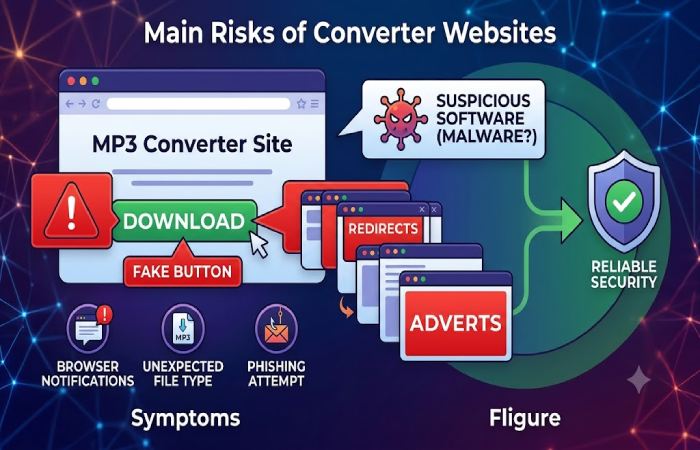
Some sites use aggressive advertisements, redirects, fake download buttons, browser notifications, or deceptive prompts. The Federal Trade Commission warns that malicious software can be distributed through deceptive websites, advertisements and downloads, and recommends avoiding unfamiliar websites for downloading free content.
Risks worth watching
| Risk | What it can look like |
|---|---|
| Fake download button | Several buttons appear before the real download |
| Redirects | A click opens unrelated websites |
| Pop-ups | New tabs repeatedly appear |
| Browser notifications | A site asks permission to send notifications |
| Suspicious software | You are told to install an extension or application |
| Malware | A downloaded file behaves unexpectedly |
| Phishing | A page requests unnecessary personal or financial information |
| Poor-quality output | The resulting audio sounds compressed or distorted |
The FTC specifically notes that malware can steal personal information, credentials and other sensitive data.
How to Recognise a Risky Converter Site
A beginner does not need advanced cybersecurity knowledge to identify several warning signs.
Be particularly cautious if a website:
- forces multiple redirects before downloading anything;
- asks you to install an unknown browser extension;
- claims your computer is infected and tells you to call a number;
- requests unnecessary account or payment information;
- downloads an executable file when you expected an audio file;
- uses fake browser or operating-system warnings;
- repeatedly opens new tabs;
- asks you to disable security software.
The FTC advises consumers not to click suspicious software advertisements and recommends obtaining software from websites you know and trust.
What About Audio Quality?
Another overlooked issue is quality.
An MP3 conversion cannot magically create audio quality that was not present in the source. If the original audio is already compressed, converting it again can introduce another layer of lossy compression.
For example:
Original audio → compressed video/audio → extracted MP3
The final file may therefore be smaller and convenient, but it is not necessarily equivalent to obtaining the original audio file from the rights holder.
| Factor | Possible effect |
|---|---|
| Original source quality | Sets the upper limit |
| Source audio codec | Influences what is available to extract |
| MP3 bitrate | Affects file size and perceived quality |
| Re-encoding | Can introduce additional losses |
| Converter settings | Affect output characteristics |
| Very low bitrate | Smaller file but potentially poorer sound |
This is why a converter claiming to produce an extremely high-quality MP3 from a low-quality source deserves scepticism.
Are Browser-Based Converters Better Than Apps?
Not necessarily. They simply shift where the processing happens.
A browser-based service may be convenient because there is nothing to install. On the other hand, you are relying on a third-party website whose advertising, privacy practices and security you may not fully understand.
Desktop software can offer more control, but downloading unknown applications creates its own security risk.
| Option | Convenience | Main concern |
|---|---|---|
| Browser converter | High | Website security and deceptive advertising |
| Desktop converter | Medium | Software provenance and installation safety |
| Audio editor | Medium | Requires more technical knowledge |
| Official download | High when available | Usually the safest route for supported content |
| Direct source from creator | High | Availability depends on creator |
For beginners, the safest workflow is usually the one that minimises unnecessary third-party downloads.
What Are Safer Alternatives?
If your objective is simply to listen offline, the first option should be to use an official feature provided by the platform.
YouTube states that YouTube Premium allows users to watch videos offline in the YouTube app.
If you need an actual audio file, look for a legitimate source provided by the creator, artist, publisher or rights holder.
For your own videos, YouTube’s own download tools are preferable to handing the URL to an unknown third-party service.
A practical decision tree
| Your situation | Better approach |
|---|---|
| It is your own video | Download it through YouTube Studio |
| You have explicit permission | Follow the rights holder’s permitted method |
| It is licensed content | Follow the licence |
| You need offline listening | Use an official offline feature where available |
| You need commercial music | Obtain it through a legitimate music service |
| You are unsure about copyright | Check the licence/rights before downloading |
What Should You Do If a Converter Downloads Something Suspicious?
Do not open an unexpected executable or installer simply because a website labels it as a converter or audio file.
If you believe malware may have been downloaded, the FTC recommends stopping activities involving sensitive information, updating security software, running a security scan and changing passwords where appropriate.
Also watch for symptoms such as:
- unexpected pop-ups;
- browser redirects;
- unfamiliar extensions;
- sudden slowdowns;
- changed browser settings;
- unexplained account activity.
These can be signs that unwanted software has reached the device.
Does Converting a YouTube Video Make It Copyright-Free?
No.
Changing the format from a video to MP3 does not change who owns the underlying copyrighted material.
If a song is protected by copyright as part of a YouTube video, extracting its audio does not remove those rights. YouTube explains that copyright owners have rights concerning the use and distribution of their creative works.
This distinction is particularly important for people who plan to reuse converted audio in:
- YouTube videos;
- podcasts;
- advertisements;
- social-media posts;
- commercial projects;
- livestreams;
- websites.
A file being technically downloadable is not the same thing as having permission to reuse it.
YT MP3 Converter — vs Official Options
The best choice depends on what you actually need.
| Factor | Third-party converter | Official/authorised method |
|---|---|---|
| Convenience | Often high | Usually high |
| Security predictability | Varies | Generally more predictable |
| Copyright clarity | Depends on content and rights | Usually clearer |
| Audio-file availability | Often yes | Depends on service |
| Ads/redirects | Can be significant | Usually lower |
| Installation risk | Varies | Generally lower when using official software |
| Best for beginners | Only with caution | Usually preferable |
The important point is that convenience should not be the only selection criterion.
Frequently Asked Questions
What is a YT MP3 converter?
It is a tool that processes YouTube media and produces an audio file, commonly MP3. Whether using one is appropriate depends on the content’s copyright status and the rights you have.
Is using a YT MP3 converter — safe?
Safety depends heavily on the specific service. Unknown converter websites can expose users to deceptive advertising, redirects and malicious downloads, so caution is important.
Can I convert my own YouTube videos?
Yes. YouTube provides tools for downloading videos that you have uploaded, after which you can use appropriate software to extract or convert the audio.
Can I convert copyrighted music?
Technical ability does not automatically provide legal permission. Copyright rules vary, so you should have the necessary permission, licence or applicable legal basis before copying or reusing copyrighted music.
Does MP3 conversion reduce quality?
It can. MP3 is a lossy format, and converting already compressed audio may result in additional quality loss.
Is downloading an MP3 the same as owning the song?
No. Possessing an audio file does not necessarily give you copyright or redistribution rights.
Final Verdict
The real issue behind yt mp3 converter — is not whether software can technically turn online video audio into MP3; many tools can perform that type of conversion. The more useful question is whether you have the right to obtain and use the audio and whether the conversion method is safe.
For your own videos or properly licensed material, downloading through an official source and then using trusted local software is generally the cleaner approach. For copyrighted music or videos belonging to someone else, check the applicable rights rather than assuming that a converter makes the content free to copy.
And from a cybersecurity perspective, treat unfamiliar converter websites, fake download buttons, unexpected installers and aggressive pop-ups as warning signs rather than minor inconveniences.