
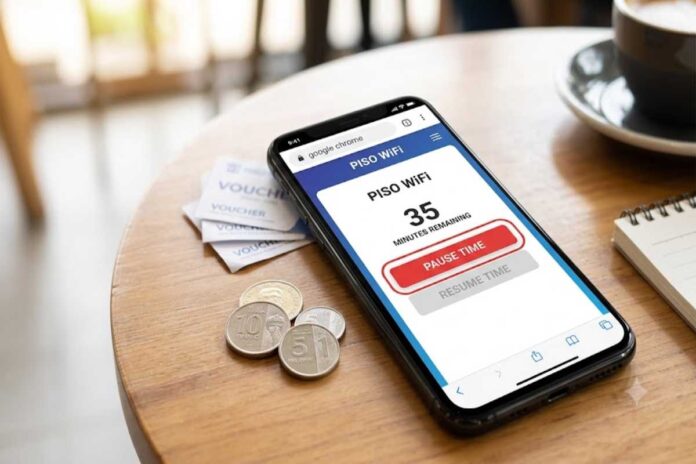
Chrome Piso WiFi pause time refers to using Google Chrome to access a Piso WiFi’s local portal, commonly through 10.0.0.1, and temporarily stop an active prepaid internet timer. When the feature is enabled by the operator, users can pause their session and later select Resume Time to continue using their remaining balance.
If you are searching for chrome piso wifi pause time, you are probably trying to stop your paid internet session temporarily without wasting the minutes you have already purchased. In many Piso WiFi systems, the process is straightforward: connect to the correct WiFi network, open Chrome, access the local portal, and select Pause Time when the option is available.
The important point is that Chrome itself does not provide the pause function. Chrome is simply the browser used to access the Piso WiFi captive portal. The actual pause and resume controls are provided by the particular Piso WiFi system and its configuration.
Table of Contents
What Is Piso WiFi Pause Time?
Piso WiFi is commonly used with coin-operated or voucher-based internet access systems. Instead of paying for a conventional broadband subscription, a user purchases a specified amount of online time.
Pause Time is a session-management feature designed to temporarily stop the countdown on an active session. If the operator has enabled the feature, the remaining prepaid time can generally be resumed later rather than continuing to count down while you are away.
For example, imagine that you purchase 60 minutes and use 20 minutes. If the system supports pause functionality, you could pause the session with approximately 40 minutes remaining and resume it when you return.
However, exact behaviour depends on the machine, software version and operator settings.
How Chrome Piso WiFi Pause Time Works
The typical user workflow looks like this:
- Connect your phone, tablet or computer to the Piso WiFi network.
- Open Google Chrome.
- Enter the local portal address provided by the operator, commonly
10.0.0.1. - Wait for the Piso WiFi session page to load.
- Locate Pause Time or a similarly named control.
- Select it to pause the session.
- When you return, reconnect to the same network if necessary.
- Open the portal again and select Resume Time.
The address 10.0.0.1 is a private local IP address commonly used by Piso WiFi installations; it is not a normal public website. The actual address can differ depending on the network configuration.
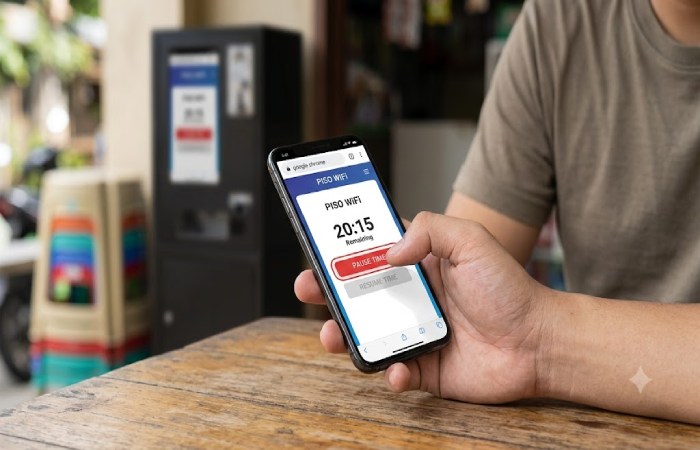
Practical Example
Suppose your session shows 35 minutes remaining. You need to leave for 15 minutes, so you select Pause Time.
If the system accepts the request, the session timer should stop. When you return, you reconnect and select Resume Time. Your remaining balance should then continue according to the system’s rules.
Chrome Piso WiFi Pause Time: What You Need
| Requirement | Why it matters |
|---|---|
| Active Piso WiFi connection | The portal is normally available only from the local network |
| Chrome or another browser | Used to access the captive portal |
| Correct portal address | Commonly 10.0.0.1, but not universal |
| Active session | Pause normally applies to an existing paid session |
| Pause feature enabled | The operator can disable the function |
| Compatible device/session | Some systems associate sessions with the connected device |
This means simply entering 10.0.0.1 while using mobile data may not work because the address belongs to the local network rather than the public internet.
What to Do If the Pause Time Button Is Missing
A missing button does not automatically mean Chrome is broken.
There are several possible explanations:
- The operator has disabled Pause Time.
- Your particular Piso WiFi software does not offer the feature.
- You are connected to a different WiFi network.
- Your session has expired.
- The portal has not loaded correctly.
- Your browser has cached an older version of the page.
- The machine has restrictions on when sessions can be paused.
Some Piso WiFi systems allow administrators to enable or disable pause/resume controls through their management interface. The exact menu names vary between platforms and software versions.
Troubleshooting Workflow
1: Check that you are connected to the correct Piso WiFi network.
2: Turn off mobile data temporarily if your phone is prioritising cellular connectivity.
3: Open Chrome and manually enter the local portal address supplied by the operator.
4: Refresh the portal and check your active session.
5: If Pause Time still does not appear, try reconnecting to WiFi.
6: If the feature remains unavailable, ask the Piso WiFi operator whether pause functionality is enabled.
Do not assume that disconnecting from WiFi is equivalent to pressing Pause. A normal disconnection may not preserve a session in the same way as the dedicated pause function.
Pause Time vs Disconnecting From WiFi
| Action | Purpose | Does it guarantee preserved time? |
|---|---|---|
| Pause Time | Temporarily stop an active session | Only according to the system’s rules |
| Turn off WiFi | Disconnect device | No |
| Close Chrome | Close browser | No |
| Turn off mobile data | Change network behaviour | No |
| Resume Time | Continue a paused session | Only while the session remains valid |
The safest approach is to use the actual Pause Time control when it is available rather than assuming that closing the browser or disconnecting will stop the timer.
Expectations: What Pause Time Can and Cannot Do
Pause Time should not be treated as an unlimited way to store internet access indefinitely.
The operator may configure session rules, expiry periods or other restrictions. Different Piso WiFi platforms can also use different portal layouts and settings.
Therefore, if you pause a session, check the portal when you return rather than assuming the balance will remain available forever.
A further limitation is that the exact behaviour can depend on the software installed on the vending machine. A guide for one Piso WiFi platform may not perfectly match another.
Is Chrome Required for Piso WiFi Pause Time?
No. Chrome is not normally a technical requirement for the feature itself.
Chrome is simply a convenient way to open the local captive portal. Depending on the device and installation, other browsers may also work.
On a Windows laptop, for example, you might use Chrome or Edge. On an iPhone or iPad, the captive portal may also be presented through Apple’s network sign-in process.
The important requirements are generally the correct network connection and a portal that supports the pause feature.
Is Chrome Piso WiFi Pause Time Safe?
The local portal itself can be part of the Piso WiFi network rather than an ordinary internet website. Nevertheless, users should be cautious about entering personal information or administrator credentials into unfamiliar pages.
For ordinary users, do not enter passwords, banking details or other sensitive information unless you understand why the system is requesting it.
Administrators have a different security responsibility. If you manage a Piso WiFi machine, use a strong, unique administrator password and avoid leaving factory credentials unchanged. Security guidance from recognized organizations consistently recommends replacing default credentials and protecting administrative interfaces.
For additional security context, this section could link to guidance from the National Institute of Standards and Technology (NIST) on authentication and password practices.
Who Should Use the Pause Feature?
Pause Time is particularly useful for people who:
- Need to step away from the Piso WiFi location.
- Want to avoid unnecessarily consuming prepaid minutes.
- Use a session intermittently.
- Need short breaks during study or work.
- Want to return to the same paid session later.
It is less useful if you are only connected for a few minutes or if the particular machine does not support pause functionality.
Comparison With Typical Public WiFi
Traditional public WiFi often provides connectivity for a fixed period, through a password, voucher or account. Piso WiFi adds a time-based payment mechanism and may provide a local portal for purchasing and managing sessions.
| Feature | Piso WiFi | Typical public WiFi |
|---|---|---|
| Time-based payment | Often | Sometimes |
| Local captive portal | Common | Common |
| Coin-based access | Common in vending setups | Rare |
| Pause/resume session | Depends on system | Depends on provider |
| Local management interface | Often | Usually hidden from users |
| Browser required | Usually for portal interaction | Often for sign-in |
The key difference is that Piso WiFi’s session controls are tied to the specific vending or hotspot system.
Common Use Cases
Students
A student might purchase an hour of access, pause the session during a break and resume studying later.
Travellers
Someone using a public Piso WiFi hotspot may pause the session when leaving the area temporarily, provided the system permits it.
Small Businesses
Operators can use session controls to offer customers more flexible access, although available settings depend on their installed platform.
Short Internet Tasks
If you only need intermittent access for messaging, browsing or checking information, pause functionality can make a prepaid session more practical.
Frequently Asked Questions
What is Chrome Piso WiFi pause time?
Chrome Piso WiFi pause time is the process of using Chrome to access a Piso WiFi’s local portal and select the Pause Time option when that feature is enabled. Chrome provides the browser interface; the Piso WiFi system controls the session timer.
How do I pause Piso WiFi time in Chrome?
Connect to the Piso WiFi network, open Chrome, access the operator’s local portal—commonly 10.0.0.1—and select Pause Time if it appears. The exact interface varies between systems.
Why is Pause Time not showing?
The feature may have been disabled by the operator, your session may not qualify for pausing, or the portal may not have loaded correctly. Check the network connection and reload the local portal first.
Can I resume my Piso WiFi session?
If the session is still valid and the system supports pausing, return to the portal and select Resume Time. Availability and expiry rules depend on the operator’s configuration.
Does closing Chrome pause Piso WiFi?
Not necessarily. Closing the browser is different from selecting the dedicated Pause Time control. If you want to stop the session timer, use the pause option provided by the portal.
Does 10.0.0.1 work on mobile data?
Normally, a local Piso WiFi address such as 10.0.0.1 is intended to be accessed while connected to the relevant local network. It is not a normal public internet destination.
Final Takeaway
Chrome Piso WiFi pause time is best understood as a browser-based way to access a Piso WiFi session control, rather than a special Chrome feature. When the operator has enabled Pause Time, users can typically open the local portal, pause their active session and later resume it.
The main limitation is that not every Piso WiFi installation behaves identically. Portal addresses, menus, session restrictions and pause availability can vary. If the Pause Time button is missing, first check your network and portal connection; if the feature still does not appear, the operator may have disabled it.