
Facebook video download — online refers to saving a Facebook video to a device through a browser or another online method. The safest approach depends on whether the video is yours, publicly available with permission, or protected by someone else’s rights.
Facebook videos are often useful beyond the platform itself, whether you want to keep your own upload, watch permitted content offline, or archive a video for legitimate personal use. The phrase Facebook video download — online generally refers to browser-based ways of saving a Facebook video without installing a dedicated desktop program.
However, not every video can or should be downloaded. Meta’s terms state that users must not share content they do not own or have the necessary rights to use, and its intellectual-property guidance specifically addresses copyright protection.
Table of Contents
What Does Facebook Video Download — Online Mean?
An online Facebook video download usually starts with the video’s share link. Depending on the video and its privacy settings, a user may save it within Facebook, download their own uploaded content, or use a browser-based service for publicly accessible content where they have permission to make a copy.
This distinction matters. A video being publicly visible does not automatically mean that it is free to reproduce, edit or redistribute. In India, copyright law protects original audiovisual works, while Section 52 provides specific exceptions in limited circumstances.
Main Ways to Save a Facebook Video
There are three practical approaches worth understanding.
1. Save inside Facebook:
Facebook’s Save feature is useful when your objective is simply to find the video again. It does not necessarily create an MP4 file on your phone.
2. Download your own content:
For videos you created or uploaded, Facebook may provide a direct download option. This is the cleanest route because you already control the underlying content rights.
3. Use an online downloader for permitted public videos:
Some browser tools accept a Facebook URL and provide a downloadable video file. These services can change, stop working, show advertisements or raise privacy concerns, so they should be treated as tools rather than guaranteed Facebook features.
Facebook Video Download Workflow
A sensible workflow is more important than chasing one particular downloader.
1: Open the Facebook video and use the Share option to copy its link.
2: Check whether you own the video or have permission to save and reuse it.
3: Decide whether you need an in-platform saved copy or an actual video file.
4: For permitted public videos, use a reputable browser-based service without entering your Facebook password.
5: Select the available video quality and check the expected file size.
6: Download the file and review it before opening or sharing it elsewhere.
Never provide a third-party downloader with your Facebook login credentials. A legitimate URL-based tool should not need your Facebook password.
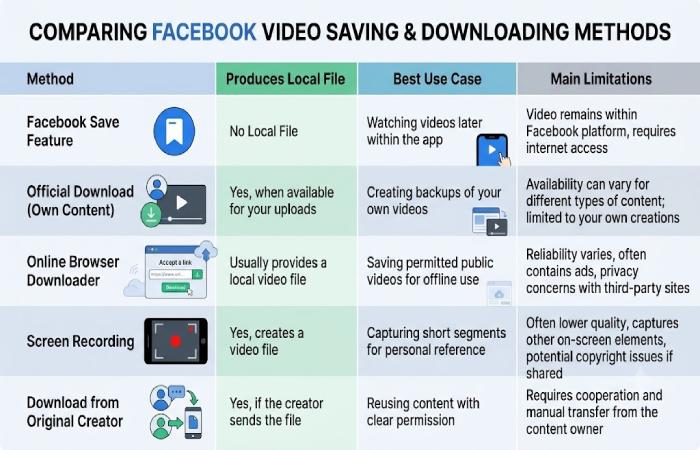
Online Download Methods Compared
| Method | Local File | Best For | Main Limitation |
|---|---|---|---|
| Facebook Save | No | Watching later | Remains within Facebook |
| Official download of your own content | Yes, where available | Your own videos | Availability can vary |
| Browser-based online downloader | Usually | Permitted public videos | Privacy, adverts and reliability vary |
| Screen recording | Yes | Personal reference where appropriate | Quality may be lower |
| Download from original creator | Yes | Reuse with permission | Requires creator cooperation |
Realistic Quality and Performance Expectations
Do not assume an online downloader will always provide the original file. The available resolution depends on the source video, access method and tool being used. A service advertising “HD” may still produce a file whose quality differs from the original upload.
File size also varies considerably. A longer 1080p video can consume substantially more storage than a short lower-resolution clip. Download speed is influenced by your internet connection, the service’s servers and the video’s size.
For mobile users in India, Wi-Fi is generally preferable for large video files because repeated downloads can consume significant mobile data.
Pros and Limitations
Advantages
- No dedicated software may be required.
- Browser tools can work across phones, tablets and computers.
- Copy-link workflows are relatively simple.
- You can choose from available quality options.
Limitations
- Not every Facebook video is downloadable.
- Private or login-protected content may not work with online tools.
- Third-party websites can contain aggressive advertising or misleading buttons.
- Downloading a file does not automatically give you permission to republish it.
- Facebook’s interface and available options can change over time.
Is Online Facebook Video Download Safe?
Safety depends less on the word “online” and more on the service you use. Avoid websites that request your Facebook password, require unnecessary browser extensions or repeatedly redirect you to unfamiliar pages.
Meta itself notes that content uploaded to Facebook may be protected by intellectual-property rights, and its terms prohibit users from sharing material when they lack the necessary rights.
Before downloading, look for a straightforward workflow: paste link, review result, select the file and download. Be cautious with executable files, browser notifications and unexpected APK or EXE downloads.
Who Should Use These Methods?
Online downloading can be useful for creators backing up their own work, businesses archiving authorised promotional videos, students keeping permitted educational material for reference, or users who have received permission from the content owner.
It is less appropriate when the aim is to repost another person’s video without consent, remove attribution, bypass privacy restrictions or redistribute copyrighted entertainment.
Use-Case Examples
A small business owner who uploaded a product demonstration can use an official download or account backup route to keep a copy.
A student given permission to save a public educational clip can use an online method, provided the source and applicable rights allow it.
Someone wanting to watch a friend’s video later may not need a download at all; Facebook’s Save feature can be the simpler option.
Copyright and Legitimacy in India
Copyright ownership should be checked before redistribution. India’s Copyright Office explains that copyright protection covers categories including cinematograph films and that the law recognises limited exceptions to infringement.
That does not mean every personal download is automatically lawful or every online downloader is authorised. The specific circumstances matter. For commercial use, editing, public reposting or advertising, obtain appropriate permission or licensing rather than assuming that a publicly accessible URL grants reuse rights.
Troubleshooting Common Problems
The link does not work: The video may be private, restricted, deleted or require login access.
Only a preview appears: Try opening the original Facebook post and copying the link again.
The downloaded file has poor quality: The source may not offer a higher-resolution stream through the method being used.
The download button opens another page: Be careful with deceptive advertisements. Close unexpected tabs rather than installing unknown software.
The video will not play: Check the file extension and try a trusted media player. Do not download additional “codec” programs from suspicious websites.
Best Practices Before Downloading
Keep the process simple. Copy the correct Facebook URL, verify that you have the right to save the content, avoid giving away account credentials, and inspect the final file before sharing it.
Most importantly, separate technical access from copyright permission. Being able to save a video does not necessarily mean you have the legal right to republish it.
FAQ
Is Facebook video download — online free?
Some browser-based tools are free, while others may use advertisements, limits or paid features. Facebook’s own saving and download options can differ depending on the type of content and account.
Can I download any Facebook video online?
No. Privacy settings, access restrictions, technical changes and copyright considerations can prevent or limit downloads. Public visibility does not automatically grant redistribution rights.
Can I download my own Facebook videos?
Where Facebook provides a download or account-management option, downloading your own uploads is generally the most straightforward approach. Meta’s terms also confirm that you retain intellectual-property rights in content you create and share.
Is it safe to enter my Facebook password on a video downloader?
Avoid it. A URL-based downloader should not need your Facebook login credentials. Sharing passwords with third-party services creates an unnecessary account-security risk.
Can I repost a downloaded Facebook video?
Not automatically. You need to consider copyright, permission, licensing and the intended use. Meta’s guidance says buying, downloading, crediting or finding content online does not by itself remove copyright restrictions.
Final Verdict
Facebook video download — online can be convenient, but the best method depends on what you are trying to achieve. For simple future viewing, Facebook’s Save feature may be enough. And for your own videos, an official download or backup option is preferable. For publicly accessible videos belonging to someone else, use an online tool only when you have the necessary permission and understand the privacy and copyright implications.
The safest rule is simple: download only what you are entitled to keep, avoid giving third-party sites your Facebook credentials, and do not confuse technical accessibility with permission to reuse content.