
Home Blog Page 52

AI Applications: The Future Of Workflow Automation

0

AI Applications – Over the past few years, businesses have made prudent investments in business process management and robotic process automation (RPA) (BPM). However, RPA and BPM must be adequate to expand automation programs independently.

Artificial intelligence is necessary for enterprises to advance (faster) in their digital transformation path. Therefore, they require AI, and not just any type will do.

These manual processes in the workflow can be enhanced by implementing AI-powered workflow automation. As a result, operations become more accessible, quicker, and more effective, increasing success.

The AI workflow automation revolution is sweeping strategic corporate decision-making, which directly impacts the productivity and long-term effectiveness of the firm more than any place else.

The Future Of AI Applications In Workflow Automation Across Sectors

Given below are the ways AI is predicted to affect and enhance the different business sectors in the future—

AI In The Manufacturing Industry

According to a PwC study, product improvements that increase customer demand will account for almost 45% of all economic benefits by 2030.

Manufacturers use AI-supported analytics and data to reduce unplanned downtime and boost productivity, product quality, and employee security.

By enhancing the capabilities of every manufacturing business function, AI may dramatically improve the quality and scope of work in the manufacturing sector.

According to Jeff Kavanaugh, Senior Partner at Infosys Consulting, “people skills must change to meet the requirements of fluid, wholly new, even unanticipated tasks that robots cannot do.”

  • Quality Improvement

Cobots, or collaborative robots, assist people with challenging professions by doing activities requiring sophisticated thought and problem-solving abilities.

  • Maintenance Planning

AI improves asset utilization and production by foreseeing unplanned equipment and machine failure.

  • Production Boosting

Businesses may successfully pinpoint the root causes of yield losses and find the critics using AI engines.

Using artificial intelligence solutions (AI) in the industrial sector is a good development, and reskilling the current workforce can lead to successful outcomes.

Humans can concentrate on tasks that provide more excellent value to their positions and the company through AI and automation.

The present workforce may be placed at the forefront of this transition if they have a working knowledge of the most recent industrial technology and practical experience.

AI In Retail Businesses

325,000 merchants will employ machine learning (ML) in some capacity by 2023. Customers are prepared to spend up to 16% extra for tailored shopping experiences using AI.

Several sizable retail outlets have implemented AI to enhance inventory management and streamline the supply chain.

People may use an image instead of keywords to search the internet using visual search, an AI innovation.

With the help of developments in digital and manufacturing technologies, firms can now provide customers with the option to personalize or create products online or in person.

According to a Deloitte survey, more than 50% of consumers are interested in buying personalized items for themselves and their friends and family. Therefore, every retailer’s IT agenda must include enabling personalization to maintain long-term competitiveness.

AI In The Healthcare Industry

Healthcare might become more affordable, efficient, individualized, and egalitarian with AI-enabled procedures and workflows.

AI is already enhancing ease and efficiency, from patient self-service to chatbots and image data analysis to find candidate compounds in drug research.

Today, AI can identify patterns across vast volumes of data that are too complicated or nuanced for humans to notice.

A hospital is no longer only a sizable structure that treats many ailments. Instead, it concentrates attention on complicated operations and the critically ill.

Smaller hubs and spokes are used to monitor and treat less acute illnesses. To track supply and demand in real-time centralized command centres analyze geographic and clinical data to track supply and demand in real-time.

AI In The Real Estate Industry

Anywhere Real Estate is utilizing AI to help eliminate prejudices and increase homeownership diversity.

Major real estate brands owned by the corporation include CENTURY 21, Coldwell Banker, and Sotheby’s International Realty. Data collection using AI has the potential to reveal hidden trends that have a detrimental influence on how people of colour buy homes.

In addition to assisting clients, AI in real estate enables brokerages and franchisees to expand by streamlining the hiring procedure.

Both buyers and sellers may use data to obtain independent advice on whether or not their current offers will be accepted and which properties would be the most excellent fit for them.

AI Applications may decrease prejudice and increase homeownership diversity by making predictions based on objective and impersonal facts.


How Digital Payments Can Benefit Your Business

0

Digital Payments Can Benefit Your Business – An already increasing digital market is now the norm as the pandemic of the past two years has made it essential for public health. Businesses that could not adapt to contactless methods of receiving payments and delivering goods found it challenging to compete with those who did. If you haven’t implemented digital payments into your business model, you may find doing so is more accessible than you first thought and may provide benefits you hadn’t considered.

Definition of Digital Payments Method

A Digital Payments Method is an electronic payment method that transfers money from one account to another using a digital device such as a mobile phone, computer, wireless data, SWIFT (Society for the Worldwide Interbank Financial Telecommunication) etc. This Method includes payments like bank transfers, mobile transfers, and payment cards, including credit cards, debit cards, prepaid cards etc. Digital payments can be partially digital or else fully digital.

For instance, partially digital payment is the one Method in which both payer and payee use cash through third-party agents, with providers creating digital bank transfers in the backend.  An entirely digital payment is one in which the payer releases the amount to an agent who receives it digitally, but then the payee gets the amount in cash from that agent.

Digital Payments Defined

A digital payment is any method of sending or receiving payment electronically without needing cash or paper checks. The most common digital strategy is a credit card or an ACH (Automatic Clearing House) payment from a bank account. Still, many people now use smartphone applications connecting to their bank accounts. These apps allow purchasers to have all their payment methods in a digital “wallet or purse” to use for purchases online and in stores.

Accepting Digital Payments

There are several reasons why businesses should consider accepting digital payments:

  1. It’s what more and more customers are expecting. Customers may take their business somewhere else if they can’t pay digitally. Receiving digital payments dramatically increases your customer base.
  2. It saves time. Programs offered by companies like Xpress Pay and info.xpress-pay.com give you options for receiving and seeing all transactions in real-time. Their platforms automatically deposit digital payments into your accounts and can also automatically integrate these transactions with accounting software like Quickbooks. This can save hours each week in accounting work.
  3. It assures payments are received on time. Receiving payments digitally means you can be paid immediately after completing a job or starting an order. There is no running to a bank to ensure a check won’t bounce or chase after payment for an invoice charge.
  4. It allows you to receive secure payments through your website, company app, or smartphone. You don’t have to turn away customers who don’t have cash or a check. Instead, you can give them a convenient, fast, and secure way to pay you.

Using Digital Payments For Company Spending

Many will talk about the benefits of receiving digital payments, but some don’t realize the advantages of using digital payments for company expenses.

Just as quickly as income from digital payments can automatically be integrated into accounting software, the same can be said for digital expense payments. Companies are saving time and money by setting up automatic digital payments for reoccurring expenses. Even more, time is saved when these expenses are automatically and fully integrated into accounting software and expense reports.

Many corporate credit card companies have developed apps that allow cardholders to upload receipts and file expense reports through the credit card company’s online portal. Some vendors will even send a digital itemized receipt to the credit card company, saving the cardholder the extra step of scanning and uploading a receipt. Again, these features save their employees time and money in expense reporting. It also lets the business track real-time spending and prevent fraudulent expenditures.

Different Types of Digital Payments Method

1. Mobile payments

Billions of people worldwide choose to pay with smartphones. People use banks’ online services w, allowing People can also transfer money through services like Bizum (Spain). In the Bizum mobile payment method, we need to enter our mobile number and confirm our purchase on a mobile banking app.

  1. QR Payments:

This payment method is fast, convenient and secure. We must open our bank’s app and scan the launch’s QR code. After that, we can choose a digital payment method and confirm our purchase.

  1. Credit and Debit Card:

It is one of the most commonly used and oldest payment methods worldwide. It is a card that slides into a payment mortal, which charges a specific amount. Many cards have near-field communication (NFC), facilitating payment without touching the POS terminal. It is also known as “contactless” payment. Recently, we have started using cards virtually on banking apps and other platforms, like “wallets” by Apple and Samsung. The Virtual “wallets” can connect with watches and other smart devices to make payments.

  1. Contactless Payments

Contactless Payments is a secure payment method using a debit card, credit card or smartcard enabled by (RFID) or (NFC). This digital payment method is growing popular due to its speed and seamless experience.

  1. Biometric Payments

The biometric digital payments method uses a Biometric ID to verify, confirm, and authorize payments. Biometric ID is a means by which a person can be exclusively identified by evaluating one or more than one distinguishing biological trait. Exclusive identifiers include fingerprints, retina, hand geometry, earlobe geometry, iris patterns, voice waves, DNA, and signatures.

Benefits of Digital Payments Method

Digital payments substantially benefit individuals, companies, governments, and international development organizations. The benefits of going digital include the following:

  • Cost savings
  • Transparency and security
  • Financial inclusion
  • Inclusive growth
  • Women’s economic participation

Digital Is Here To Stay

Paper cash and checks are becoming the exception rather than the rule. Companies that do not implement methods for receiving and accepting digital payments will fall behind in a digital market that is here to stay.

WhatsApp conference call – Description, Process, Application, and More

0

What is WhatsApp conference call?

Although the application allow WhatsApp conference call with several contacts, possibly the most helpful tool for this, we all have it installed on our mobile.

However, there is no means for you to see them and chat face to face with them.

It is not the same as the bar, but less is nothing.

Making a video call on WhatsApp, the first thing to do is open the “app” and find one of the contacts with whom you want to make the video conference.

If you click on it, you will see how the conversation opens and how two icons appear in the upper area of the screen.

One of them is in the form of a video camera, and it is one which you must press to start the video call.

How can you do WhatsApp conference call?

  • Once the contact accepts the call, you can start adding new participants to the video conference.
  • Now, we must bear in mind that we can connect four simultaneously.
  • So, in case there are more who want to participate, they will have to rotate.
  • Of course, it was in a tiny group of users: while one of our mobiles had the possibility, the rest maintained the limit of four.
  • And that changed after the publication of the new beta on Google Play:
  • WhatsApp activates the eight participants with version 2.20.135: install it, and that’s it.
  • The process is straightforward: with a couple of steps, you will be chatting with a microphone and video in a group of up to eight people.

Process

You have to do the following:

  • Download the latest beta of WhatsApp, which corresponds to version 2.20.135.
  • If you did not sign up for the beta ( you can still do it on Android ), download the Apk Mirror application.
  • All call participants must have the latest beta: make sure before establishing communication.
  • Open WhatsApp and go to the calls section.
  • Click on the ‘+’ at the bottom right and then on ‘New group call.’
  • Choose the seven contacts you will call.
  • Once selected, click on the phone icon or the camera icon, depending on the communication you want (calls or video calls).
  • Free monday.com alternative it comes with collaboration features, timeline views, calendar views, time tracking features, and dozens of integrations

How to make a group video call outside of a group?

  • If we want to make a videoconference via WhatsApp with co-workers who are not within a group, we must do the following:
  • Open the “Calls” tab (with the application open at the screen’s top right).
  • Click on “New call” (phone icon with +) and then “New group call” (two-person icon).
  • We search or select the contacts we want to include in the call.
  • And we touch “Video call” (video camera icon).
  • Obviously, as in the previous case, we can only add to the video call the people whose contact we have saved in our schedule.

How many people can meet at the same time?

  • Although WhatsApp video conferencing allows you to call several people, the truth is that this number is more limited compared to other applications.
  • In total, the video call supports 4 participants, that is, the person making the video call and three other people.
  • The mobile screen will be divided into four segments to show the 4 participants.

Know, How to manage the reception of group video calls?

  • When we receive a group video call through WhatsApp, the application will notify us by showing us who the participants are to never.
  • Enter a group video conversation without knowing it. We can accept or reject the video call.
  • If the person who made the video call or another participant hangs up, the video call will remain active as long as users connect to it.
  • If we want to stop transmitting video, click on the crossed-out camera icon.
  • And can expel no participant from the videoconference, each person having to end the call by clicking on the hang-up icon.
  • Video calls record in the Calls tab, so we can use this history to repeat them.
  • When we want to make a video conference with the same group and thus not repeat the entire process.

Can make video conferences through WhatsApp on your PC?

  • Now, if you have WhatsApp Web installed on your computer, you may be wondering.
  • The answer is no. At the moment, the computer application does not allow video calls.

Can I make a group video call from an individual chat?

  • Yes, we can also make a group video call from an individual chat. It’s effortless. You have to follow these steps:
  • Once in the individual chat, we touch “Video call” (the video camera icon).
  • Once our contact has accepted the video call, we must click on “Add participant” (an icon with + and a person in the upper right corner).
  • We search or select the additional contact we want to include in the video call group and touch “Add.”
  • KNOW MORE:- healthandbeau

New batman game – Description, Expected Title in 2022, Character Styles, and More

0

What is the New batman game?

The New batman game is within the Dark Knight universe that Warner Bros. has presented at the DC Fandom event.

This new title is currently in development for PlayStation 5, PlayStation 4, Xbox Series X, Xbox One and PC, and is expected to go on sale throughout 2021.

After months of speculation, the American company has not only revealed the existence of this new game.

Still, it has shown it in depth through a cinematic trailer and a video with 7 minutes of game-play in which one of its main features, the ability to play cooperatively.

Robin, Batgirl, Red Hood, and Night-wing will be in charge of replacing Batman in this new third-person action-adventure.

Characters Styles

  • Each of these heroes will have unique combat styles and abilities, allowing them to have more options when facing a mission.
  • As has been rumored since last year, Gotham Knights’ story will revolve around.
  • The Court of Owls’ story arc is a criminal organization that for centuries has controlled the Gothic city from the shadows.
  • Gotham Knights are being developed by Warner Bros. Montreal, the studio behind Batman: Arkham Origins.
  • Meanwhile in Rock-steady Studios the team is responsible for the Batman Arkham series.
  • It is working on Suicide Squad: Kill the Justice League, another title within the DC universe expected in 2022.

Follow with us the DC Fandom 2020

  • The DC Fan-Dome will serve very well DC and Warner Bros.
  • It is to show all the great news and the immediate future of the DC Universe.
  • Comics, movies, series, and video games have a place if they will last 24 hours.
  • And also, it consist of streaming, which will hold different panels and presentations.
  • There will be, among many other different things, Zack Snyder’s version of The Justice League or the first trailers of The Batman and the new Suicide Squad movie.
  • During the presentation event, the developers showed Batgirl and other superheroes fighting in Gotham on a stage where Batman is dead.
  • “A bold move that takes Batman out of the equation,” analyzed Dan Casey, creative director of the Nerdist platform.
  • It is adding that the game looks “very promising.”
  • It is in development in a studio owned by Warner Bros in Montreal.

Enthusiasm for the game is very high

  • The most recent release starring the iconic hero was Batman: Arkham Knight, released in June 2015.
  • The game will launch on Play station family consoles, Xbox, and PC.
  • Also, we can see which will feature solo and cooperative game modes are there.

MORE INFO:- enhancemybeau

Backup Iphone To Computer – Description, Steps, Different Ways, and More

0

How to Backup Iphone to Computer?

  • Backup Iphone to Computer is easy and simple, means copying individual folders and changing iPhone, iPad, or iPod to your PC.
  • Backing up is one of the simple ways to ensure that information on your device is not lost if it is damaged or lost.
  • Having a backup is also useful if you get a new device and transfer your old settings to it.
  • It has the files on system and data syncing automatically.
  • Without making a backup, certain data is synchronized with iCloud, which will always be backed up.
  • To see which files are being synchronized in this way, you must go to Settings> your name> iCloud and verify that the tab for those data is green, which indicates that they are being synchronized.

What type of data is available?

These are the data that you will find available:

  1. Photos
  2. Contacts
  3. Calendars
  4. Reminders
  5. Notes
  6. Messages
  7. Safari
  8. House
  9. Health
  10. Wallet
  11. Game Center
  12. Siri
  13. iCloud Drive
  14. Other native apps (Pages, Numbers, Shortcuts, Maps, etc.)
  15. Other third-party apps (Word, Excel, Acrobat, WhatsApp, etc.)

IOS Backup with/or iCloud

If you have an iPhone, iPad, etc., you should know that the operating system allows you to make a copy of your terminal so that if you ever have to restore it, the device is as it was when you made it.

The wallpaper, the applications, and all the settings you have made will be saved in this copy made through iCloud.

Back up the device

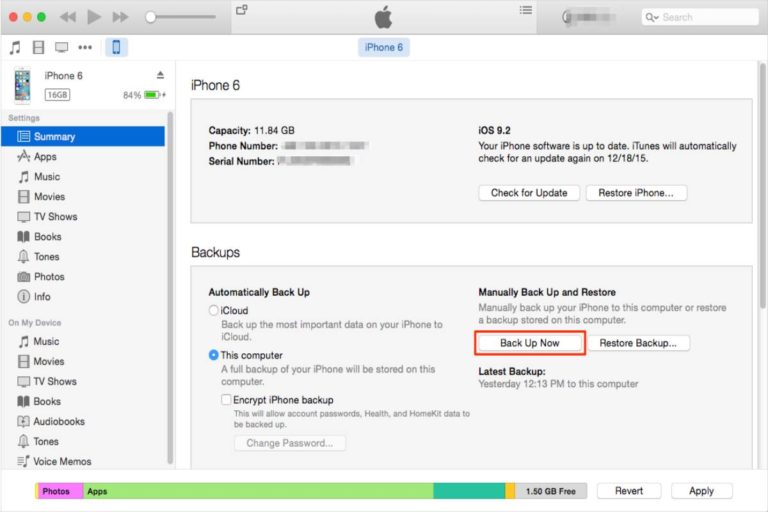
  • iTunes will always automatically backs up your device when you connect it to your computer.
  • However, you can also make a backup of the machine at any time.
  • If you have iOS 3.0 one or later, iTunes can encrypt your backups to protect your data.
  • And also, connect your device with the computer with which you usually sync it.
  • Then, you can also easily connect your device or mobile using a USB or USB-C cable or a Wi-Fi connection.
  • To turn on the Wi-Fi connection, see monday.com content calendar on PC with your devices using a Wi-Fi hotspot.
  • You iTunes app on your PC, click the device button near the iTunes window’s upper left corner.
    Click Summary.
  • And also, click “Back up now.”
  • To start your backups, select “Encrypt [ device ] backup,” enter a password, and click “Set password.”
  • To view the backups stored on your computer, choose Edit> Preferences and click Devices.
  • When a blockage is encrypted, a lock icon is displayed in the backup list.

Also Read: Some Helpful Resources on Dyifo

Restore your device from a backup

  • If you ever need to restore the information on your device that you have backed up, you can.
  • Firstly, connect your device with the computer with which you usually sync it.
  • secondly, you can connect your device easily using a USB or USB-C cable or a Wi-Fi connection quickly.
  • And also, to open Wi-Fi syncing, see Sync iTunes content on PC with your devices using Wi-Fi.
  • In your PC iTunes app will be present, click the device button near the iTunes window’s upper left corner.
  • Firstly, click Summary.
  • Then, click on “Restore Backup”
  • If the backup is encrypted, iTunes will ask you to enter the password to restore all files and settings.
  • The automatic backup includes text messages, notes, call history, favorite contacts, sound settings, widget settings, etc.
  • And also, photos from Camera Roll or “Saved Photos” are also included in the backup.
  • Other media files like songs, videos, and some pictures are not backed up but can be restored by syncing with iTunes.
  • KNOW MORE:- ethnicwearmen

Top Apps to Use During March Madness

0

The moment the annual NCAA March Madness season arrives, thousands of supporters across the United States join the frenzy in preparing themselves to tune in on the action. Some may have plans to attend the basketball tournament games, while others may choose to watch the games in the comfort of their home with friends and family. 

When we merge technology and sports, the first things that come to mind are March Madness bets and the convenience we have of accessing resourceful data like March Madness predictions. However,  technology also makes it possible for us to enjoy hobbies like watching our favorite March Madness games on our smartphones. 

So, if you happen to be a fan of the basketball tournament and are looking for the best apps that you can download to tune in on the action, well, you’re in luck because we’ve put together a list of top apps that you can install to watch your March Madness games. 

Your Top Smartphone Apps

College Basketball Radio

College Basketball Radio is a great app for fans who enjoy the radio experience of listening in on all the action. If you find yourself on the go and unable to watch the game on your mobile device, then the app can be an amazing alternative to keep you in the loop without you needing to focus on your favorite games visually. 

The app comes with a simple UI and is also said to be really simple to use. Here, its developers focus primarily on the app’s audio functions and not necessarily the design, and this is to ensure that you have proper access to information like the latest news fix, standings, data scores, and schedules. The app also includes additional features that users can use to customize their experiences. 

To listen to the radio, you will need an internet connection, and we advise using a WiFi connection as your mobile data may run out at some point. But nevertheless, the app comes with an overall rating of 4.4 out of 5 stars; therefore, you can be confident in knowing that it certainly serves its purpose, as many users would highly recommend it.  

Sports Alerts

Sports Alerts- NCAA Basketball edition is a live score app that focuses primarily on NCAA basketball. It comes with a simple design, and that’s because developers focus all their attention on the actual content of the games, including the stats and data that go with them as well. As it stands, the app has one of the highest ratings in being one of the best live score apps for basketball. 

Not only does it deliver match results, but it also offers a ton of other information that could be very useful to you. Notifications are configurable, so you have the option to choose what you would like to be notified on, and the app provides users with full team rosters, conference standings, team schedules, and AP ranking. Believe it or not, the app is free to download and use; however, there are in-app purchases for those looking for some additional perks. 

Men’s College Basketball

It doesn’t take much to figure out what the Men’s College Basketball app is about since its name basically does all the explaining. With a simple design, the app is known to deliver a ton of information that’s beneficial to fans who are invested in college basketball. 

The app works to deliver live scores to your smartphone with the support of push notifications. Although it doesn’t offer as many options as some of the other apps mentioned on the list, it remains a pretty useful app. Here, you can check out the live game, game preview matchups, and box score stats while keeping an eye on the AP top 25 rankings too. 

To make the app even more appealing to March Madness fans, the app comes with TV listings. Plus, it includes features that allow you to customize schedules according to your preference and filter your account according to teams, conferences, and divisions.

How to Free up Space on Android – Method, Application, Cache, Tips, and More

0

How to free up space on android – A warning message How to free up space on Android, advising no space available in the phone’s memory or that it is about to run out.

Although it is becoming less common, far from the first Android phones (it also happens in iOS), it can still occur.

A symptom of continued use of the phone and call the “junk” and unnecessary files we accumulate.

That is why it is good that, periodically, we free up space on the mobile, for which we can follow some very accessible steps.

Deleting apps, you don’t use

  • We start with the obvious step that is none other than deleting those applications.
  • At some point we have installed and that we no longer need or have stopped using.
  • They occupy valuable space in the memory of our phone, and we can end them within the “Settings” and in the “Applications” section.
  • Click on the one we want to “Uninstall”.
  • Another option is to have it from Google Play, in which step we must open the Google Play application.
  • And once inside, click on the “Options” menu, which appears with the icon of three horizontal stripes in the upper left corner of the screen.

Applications

  • We look for the option “My applications” and games, we press it.
  • And it will take us to a screen to manage the applications purchased, installed, or those that you installed at some point.
  • Click on the “Installed” tab to know what applications are currently on the mobile.
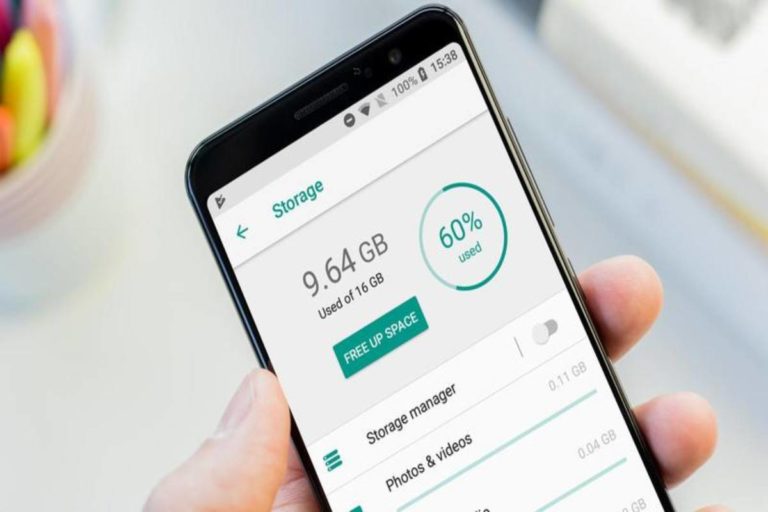
  • We will see above a window called “Storage” that shows the percentage of storage occupied by applications and the amount in GB of space that you have accessible.
  • If we click on this window, we will see a menu to free up the mobile by choosing several uninstall applications.

Blasting data and Cache

  • If you don’t want to delete it, the famous “just in case,” you can always choose two intermediate solutions, also from the “Applications” menu.
  • When entering the desired app, we can either delete the data or delete the occupied cache.
  • We leave the app with the first option as if we had just installed it, deleting data, accounts, games, etc.
  • While with the deletion of the cache, we will strike down the data that the application has been storing from the first use to accelerate thus and better its operation.
  • In this case, we can note that if it is a commonly used app, this cache will not take time to fill up again.
  • What is also true is that between the two options, we can save quite a few megabytes.

Check the downloads folder

  • On the PC, in Android, we find over time with a “Downloads” folder that can be pretty bulky.
  • If we download content regularly and especially if they are multimedia files, this folder can be quite large.
  • That is why it is worth going to the folder using the relevant file explorer on your phone (each brand may receive a different name).
  • It is about looking for the “Downloads” or “Downloads” folder and deleting all the files.
  • You have been downloading and accumulating in this folder and that you no longer need.

Also Read: Convert PDF to Kindle – Methods and Steps to Convert PDF to Kindle

Tesla Car Battery – Description, Production, Specifications, and Durable Tesla car battery

0

Tesla Car Battery

The Tesla car battery, the Californian tycoon has not provided data on what type of car we can expect, much less on its characteristics.

Recently there was speculation about a compact hatchback version of the Tesla Models.

Although a sketch of a compact car made in China was leaked earlier this year for the whole world.

Therefore, it is not clear which car it will be, but it does seem clear that Tesla’s cheapest car will be smaller than current models.

More powerful, durable, and cheaper batteries

  • To make the production of a more affordable electric car plausible, Tesla will begin to manufacture a new generation of batteries.
  • For electric vehicles that promise to be more powerful, durable, and cost half that of current cells.
  • This last aspect of the price is a determining factor in making the electric car cheaper since batteries currently account for around a third of its production cost.
  • Specifically, Tesla’s new, more giant cylindrical cells, dubbed ‘4680 Cells’ due to their diameter (46mm) and height (80mm).
  • It will provide five times more energy, six times 16% more power. Autonomy, Musk said.
  • As explained by Musk, the cost reduction goes through recycling the battery cells at his Giga-factory in Nevada.
  • It is reducing the use of cobalt one of the most expensive materials to practically zero.
  • A decision that contrasts with the agreement reached with the British miner Glencore.

Specifications

  • It could supply it with up to 6,000 tons of cobalt per year, necessary for its expected million-mile battery, made up of a nickel-cobalt-aluminum alloy.
  • Be that as it may, Tesla has been reducing the use of cobalt in its lithium-ion batteries over the years.
    It seems that it will go further from 2016 to the present.
  • That amount reduces to 7 kg per vehicle with the new Model S and Model X, and for Model 3, the cobalt reduces to 4.5 kg.
  • Instead of cobalt, the chemical elements that will gain weight in the new batteries’ composition will be nickel and silicon.
  • Both are easier and cheaper to extract, but the physicochemical properties of the second, together with the new design of the electrodes.
  • It reduces the batteries’ degradation as they add charge and discharge cycles. Tesla expects battery life to increase by 20%.

Main Innovations

  • Another of the main innovations that, it seems, will make it possible to make your new batteries easier to manufacture.
  • It is cheaper is to eliminate the component that acts as an interface between the cells and the device to which they transfer energy.
  • Also, they have redesigned the cells to reduce the path that electrons must follow to avoid failure due to overheating.
  • Eliminating elements means reducing weight and volume and consequently weighing less on the electric car’s autonomy.
  • Production capacity will multiply by 85 in three years.
  • Tesla will produce the new battery cells initially on a new assembly line near its vehicle plant in Fremont, California.

Production

  • The production is planned to reach ten giga-watt hours a year by the end of 2021.
  • To put it in context, Tesla and its partner Panasonic now have a production capacity of around 35 GWh at the Nevada macro battery factory.
  • However, the firm expects those figures to increase by 85 in just three years to 3 terawatts-hour per year, or 3,000 gigawatt-hours.
  • Achieving these figures among other things making current and future battery factories is much more productive.

Also Read: Tempo – Definition, Specifications, Technology, and More