
Home Blog Page 51

The Advantages Of A Hosted VoIP System 

The Advantages Of A Hosted VoIP System 

VoIP System – Nowadays, many business people out there are selecting a Hosted VoIP system as it has several advantages. This decision will help make them achieve better work indeed. 

As you have been hearing a lot about business phone services and still you don’t know what is meant by such a term, we will be explaining more about such a service via this article. 

What is a VoIP Phone System?

VoIP (Voice Over IP) is basically a means of transmitting voice calls over IP networks. A VoIP phone system lets phone calls be made via an Internet connection, rather than well-known landlines.

Here are a few advantages of such a Phone System:

1-Low cost

When you buy a Hosted VoIP phone system, you will be getting a high service at a competitive price with many benefits! However, purchasing such a system doesn’t mean that you are buying a phone system at all!  

You will get VoIP phones and the programming of the system is completely flexible and scalable as you grow.  

2-No Contracts needed

Many Hosted VoIP providers provide a no contract-based solution.  

While the traditional provider will always ask for a contract. 

A hosted VoIP provider that provides no-contract service will offer you peace of mind if you decide to end a business at any time. 

So, VoIP decreases costs compared to an old telephone system. Also, you can make more savings by studying the different offers from various suppliers. 

However, be careful to consider the features included. Some service suppliers might add additional fees for options that others include as standard in the packages. 

Thus, these characteristics must be adapted to your activity. 

3-Better Audio Quality

Compared to traditional phones, this offers a better sound quality without any interruptions and muffled audio than conventional phone systems

Other Features of such a System:

1-Ability to use the system from any place worldwide. In other words, the system is too flexible. You will be able to hire a virtual staff as your employees will never be obliged to work from the office. They can receive and answer calls from their comfortable bed. 

They only need a handset, a laptop and a high-speed internet connection. 

2-Transferring calls both internally and externally helps improve the reachability to your callers.

3-Receiving voicemail via email offers you the chance to know the caller’s needs and quickly forward the message or call them back to provide answers.

 4-The ability to link clients with the desired destination. That is because the system allows you to set up a guide to help customers press the buttons which leads them to the person who will really serve them. 

 5-The ability to grow into other markets and have each location on the same phone system. This technology helps you expand your business effectively. 

You can select whether your employees will have a direct dial number that is local to them or to your headquarters in case they are working from other locations or even both. 

How Does VoIP Work?

First, you must create an Internet connection so that your device may connect to your Local Area Network (LAN), and when you dial a mobile number, your IP phone asks your VoIP service provider to call the other party.

The call is created via your VoIP services, and data packets from your IP device are exchanged. These digital signals are then translated back into sound that is heard on your device.

And now you know what the VoIP phone system is, what are its advantages and how it works! So, are you going to install such a system to enhance your work and increase your profits? 

How to properly Promote Websites? Is it possible to make really good money on it?

Promote Websites

Promote Websites – Having a website is like owning your own little business. You can share your products and services with the world and make money while you sleep.

But how do you get people to visit your site? And if they do, how do you keep them there?

There are two main ways to promote your website: paid advertising and SEO. Paid advertising is when someone pays you money to advertise their product or service on your site. SEO is when someone organizes the content on your site so that it ranks well in search engines like Google and Bing.

When it comes to paid advertising, there are many advertisers out there who will pay top dollar for exposure (and hopefully sales). But if you’re just starting out and don’t have much experience with online marketing, paid advertising might not be for you. It requires a lot of time and effort to set up an ad campaign that works well for everyone involved—you need to know what type of ads will work best for your audience, how many ads are needed to reach a certain level of success with real money pokies online. So unless you already have a following or have some other way of making money online (like affiliate marketing), paid advertising isn’t necessarily the best option for getting started in this area.

How can promoting sites help develop logic?

Logic is the foundation of good writing. It makes your sentences sound more natural and adds a sense of structure to the way you communicate.

Promote Websites

But how do you develop logic? Here are some tips:

-Using subject-verb agreement: It’s important that your verbs agree with the subjects they’re acting on. If a subject is “she,” but her name is “she” in the sentence, then it must be said to use subject-verb agreement.

-Using parallelism: Parallelism is an important technique for creating a flow in your writing. It helps readers see what’s happening at each point in time, and so they can follow along more easily. You can read more about this topic here: https://www.bbc.com/news/business-62078999 .

-Using repetition: Repetition helps readers learn new material quickly. For example, if you’re teaching someone how to cook something, you might repeat steps until they have a firm grasp on them.

Gambling. Is it possible to make money on these sites? 

Gambling is an activity that can be profitable for many people, if you know what to do.

The first thing you need to know about gambling is that it’s a game of chance. The odds are always in your favor, but there will always be those who win and those who lose. You can make money by Promote Websites gambling, but only if you have a strategy for winning and losing.

Promote Websites

There are a few ways you can make money gambling online, but the easiest and most common way is by using betting sites like the best Australian online casino. These sites offer dozens of different games and prizes, including slot machines, card games, roulette, blackjack, baccarat and more. They also have some interesting features that other sites don’t offer like live chat support and 24/7 customer service representatives available around the clock.

You can also earn money by playing in tournaments or leagues where players compete against each other on an ongoing basis rather than just once at a time like in traditional casino games like craps or roulette. In these types of games there are usually some kind of prize given out at the end of each season as well as some kind of payout for winning if there is one available.

Conclusion

Promote Websites – This article is aimed at providing you with a simple, yet effective guide to creating a website that’s both aesthetically pleasing and an effective marketing tool. The process can seem daunting, but it really isn’t as difficult as it looks. By following the steps outlined in this article, you will learn how to create a website that will help you attract new customers and generate leads for your business.

Galaxy Note 10 – Specifications, Review, Differences, and More

Galaxy Note 10

Difference between Galaxy Note 10 and Note 10 Plus

  • There are four main differences between the Galaxy Note 10 and the larger Note 10 Plus.
    1. Screen size and resolution
    2. Battery size, shape, and charging speed
    3. Micro SD expansion
    4. Memory (is more RAM and storage on the Note 10)
  • The Galaxy Note 10 Plus gets an additional Depth Vision camera, but we won’t cover that in detail here.
  • The major difference you can see is that edge detection, and bokeh in portrait mode isn’t as good on the Galaxy Note 10 as it is with the Note 10 Plus camera.

What a smaller Galaxy Note 10 look like?

  • It is really great as the smaller size of the Note 10 is actually the major reason I want it over the larger version.
  • I usually use the smaller Pixel 3 as my routine driver, so the news is I like a more easily pocketable phone.
  • The thought of having a phone that can do everything a Note can but in a small form was too enticing a prospect to refuse.
  • If you are more into your phone being light and pocket-friendly, the smaller Note 10 may be good for you too.
  • It’s 13.5% smaller and 17-18% lighter than the Note 10 Plus but still does most of the same thing.
  • The smaller Note 10 footprint — about being similar to the Galaxy S10 — means you don’t quite get the full-blown, super-immersive Note 10 Plus experience, but you do get something very close.

What can be the Galaxy Note 10 battery life?

  • One of the upshots of a small, lower-resolution screen is battery savings, something you need to be given the Note 10’s meager 3,500mAh cell.
  • The Note 10 battery is not appropriately exact and tiny for the phone screen, but it is far from what most people would want on a phone like this.
  • Fortunately, the battery performance on the Note 10 is about the same as on the larger version’s 4,300mAh battery.
  • Unfortunately, they’re both just ok.

 The best thing about it

  • I can say the size, hands down.
  • It has a fantastic Samsung screen display with an S Pen that’s nowhere near as huge as the bulkier Note 10 Plus.
  • You can get the same software experience, excellent performance, awesome cameras, and fantastic S Pen functionality, but in a form that is more good and realistic for people.

What is the worst thing about it?

  • Well, I can say, probably battery life.
  • While it’s ok, it isn’t enough to power a phone through after a full day of serious use.
  • When you keep everything you can in a phone like it, you have to expect it to be heavier than an average user.
  • Its battery is fine, but it’s not quite up to the task of meeting a power user’s all-day needs.
  • If you are not as fixated on battery life as some of us, then you can be able to look at it in the past; the battery life is, after all, much similar to a lot of other phones on the market.
  • But it is meant to be better than all of them, and when it comes to battery life, it’s just the same.

Night Vision Camera Surveillance: Enhancing Security and Protection

Night Vision Camera Surveillance_ Enhancing Security and Protection

In an age where security is of utmost importance, night vision camera surveillance has become an indispensable tool for ensuring safety. Whether you’re looking to protect your home, business, or any other property, night vision cameras offer a clear and reliable solution for monitoring activities around the clock. Their ability to capture high-quality images and video footage in low-light conditions makes them an essential part of any modern security system. This article delves into the benefits, technology, and key considerations when integrating night vision cameras into your surveillance setup.

Understanding Night Vision Camera Surveillance

Night vision camera surveillance operates using infrared (IR) technology, which enables the camera to see in complete darkness. These cameras use IR sensors to detect heat signatures and convert them into visible images, making it possible to monitor areas even when no visible light is available. The IR lights, typically emitted by the camera itself, illuminate the area being monitored without being visible to the human eye. This makes night vision surveillance a valuable tool for both residential and commercial security, providing an enhanced layer of protection during nighttime hours.

The technology behind night vision cameras has evolved significantly in recent years, offering a variety of options depending on the level of surveillance required. Some models are equipped with advanced features like motion detection, remote viewing, and automatic adjusting capabilities to ensure that footage remains clear regardless of lighting conditions. These advancements allow for more precise monitoring, ensuring that potential threats are detected and recorded even in the darkest environments.

Key Benefits of Night Vision Camera Surveillance

Night vision camera surveillance provides a range of benefits that make it a popular choice for property owners and businesses alike. One of the primary advantages is the ability to monitor spaces at any time of day, particularly in low-light or no-light conditions. Traditional cameras often struggle to capture clear images in the dark, but night vision technology eliminates this problem, ensuring that you can always maintain a clear view of your property.

The effectiveness of night vision cameras is especially apparent in areas that are prone to criminal activity during the night, such as parking lots, driveways, or secluded areas. In such locations, potential intruders are more likely to take advantage of the cover of darkness to engage in illegal activities. By installing night vision cameras, you can deter criminal behavior and ensure that any suspicious activity is captured on film, making it easier to identify and apprehend offenders if necessary.

Another significant advantage is that night vision surveillance cameras are often equipped with motion detection capabilities. This feature triggers the camera to start recording when movement is detected, which helps conserve storage space while also focusing on relevant events. The ability to monitor only when necessary means that you can reduce the amount of unnecessary footage, making it easier to sift through recorded material and find critical moments.

Choosing the Right Night Vision Camera for Your Needs

When it comes to choosing the best night vision camera surveillance system, there are several factors to consider to ensure that the system meets your security needs. One of the key factors is the camera’s infrared range. The IR range indicates how far the camera can see in complete darkness, and it can vary significantly between different models. For residential areas, a camera with a short IR range may be sufficient, while larger properties or commercial establishments may require a camera with a longer infrared range for optimal coverage.

Resolution is another important consideration. Higher-resolution cameras provide clearer, more detailed images, which can be essential for identifying individuals or objects at a distance. Most night vision cameras are available in resolutions ranging from 720p to 4K, with higher resolutions offering better clarity. However, it’s important to balance the resolution with the storage capacity available for your surveillance system. High-definition footage takes up more storage space, so it’s crucial to ensure that your system has the necessary storage capabilities to handle the footage generated by high-resolution cameras.

Durability and weather resistance are also vital factors, especially for outdoor installations. Night vision cameras used in outdoor environments should be able to withstand various weather conditions, such as rain, snow, and extreme temperatures. Look for cameras with a high Ingress Protection (IP) rating, which indicates their resistance to water and dust. A camera with a rating of IP66 or higher is generally suitable for most outdoor applications.

Finally, ease of installation and integration with existing security systems should be considered. Many night vision cameras can be connected to home automation systems, allowing for remote monitoring and control via smartphones or computers. This connectivity ensures that you can keep an eye on your property from anywhere, providing additional peace of mind.

The Future of Night Vision Camera Surveillance

As technology continues to evolve, so too do the capabilities of night vision camera surveillance systems. The future of night vision technology looks promising, with advancements in AI and machine learning enhancing the ability of cameras to identify specific objects, behaviors, and even faces. Some systems are already able to distinguish between a person, vehicle, or animal, ensuring that only relevant footage is recorded, which reduces the amount of footage that needs to be reviewed.

Additionally, night vision cameras are becoming more integrated with other security technologies, such as smart home systems, alarm systems, and even drones. This integration allows for a more comprehensive and coordinated security solution, offering real-time alerts and responses in the event of a security breach. For example, if a night vision camera detects movement at an unusual hour, the system could trigger an alarm, notify the homeowner, and even send a drone to investigate further.

Night vision cameras are also becoming more affordable and accessible to a wider range of consumers. As the technology improves and competition increases, prices for high-quality night vision surveillance cameras are expected to continue to drop, making them more affordable for everyday use. This increased accessibility will likely lead to even greater adoption of night vision cameras in both residential and commercial settings.

Google docs – Definition, Methods, Applications, and Tips

Google docs – Definition, Methods, Applications, and Tips

What are Google docs?

Google docs was what we now know as Google Drive, it is an office suite similar in function and behavior to Microsoft Office.

And that offers us the possibility of creating online documents on any platform we are on.

Through Google Drive, we will be in a position to create text documents, spreadsheets, and presentations.

It will remain in the cloud but synchronized with any device that has at least one browser among its applications.

It is why Drive is a fantastic tool for collaborative, un-tethered work.

Applications of Google docs

  • You could say that Google Drive was born twice.
  • The first one is called Google Docs from the hand of two main applications:
  • Writely and Spreadsheets, the first of which was bought by the Mountain View company in 2005, and the second a proprietary development.
  • The second birth occurred when Google merged Docs.
  • This development incorporated a text editor, a spreadsheet, and a presentation application with Drive.
  • Smart sheet pricing is the only platform that can scale from a single project to end-to-end work management
  • From this merger, Google Drive was born, precisely in 2012, and observes a few differences with the old service.
  • In addition it changed the URL of the service from “docs.google.com” to “drive.google.com.”
  • It also increased the storage capacity, reaching up to 15 Gb.
  • Currently free and shared among other services offered by the company.

What can we do with Google Drive?

  • However, these are not the only changes since Google Drive also allows us to work now in real-time and collaboratively.
  • Choose who will be able to see a file and who will not, and even grant more or less permissive permissions to each of them.
  • It means that we can create documents with other people together regardless of the time or geographical location of those involved.
  • We can also always have all our work stored and organized in specific folders, and also safely.
  • And the best of all is that we can access the documents stored in Drive from anywhere and anywhere, as long as we have an Internet connection.

Documents

What is a Document?

  • A document is a form of information. The document can be converted into electronic form and saved on a computer as one or more files.
  • Often one document becomes one file. The entire document or individual parts can be viewed as separate data items. Like files or data, a document can be part of a database.
  • Electronic Document Management (EDM) deals with the management of documents stored electronically.
  • Document management Process is the method of managing and tracking your files, data, and information. Adequate systems and software are required for smooth operation.

Document Types

  • We can also edit documents in DOC, XLS, CSV, ODS, ODT, PDF, RTF, and HTML formats without compatibility problems.
  • Of course, suppose we store the documents on the device.
  • In that case, we can use them to work.
  • When we arrive at a location with an active Internet connection then documents are created or saved.
  • It will be synchronized with the cloud to be available on all other devices and people who wish to access them.
  • And also, it provides us with an extra advantage: that of not needing to perform any backup if our hardware fails.
  • It means that if the notebook breaks, we can continue exactly where we were using a tablet, PC, or even a smartphone.

Conclusion

  • As we can see, Google Drive is a truly complete suite and perhaps the best alternative to Microsoft products for the office, whether in the cloud or on the desktop.
  • If we manage to break free from the ties that keep us glued to the conventional desktop.
  • We will be able to see the fantastic features that Drive has to give us, in addition to verifying the benefits that we can obtain from the so-called “Cloud.”

Hiring for Success – Key Considerations in Talent Acquisition

Hiring for Success - Key Considerations in Talent Acquisition

Talent Acquisition – When your business is growing, it’s time to hire new employees. But how do you find and select the best candidates?

Successful talent acquisition depends on a candidate-focused process with accountable hiring managers and recruiters who function like a sales team. It also relies on clear communication and data literacy.

Know What You Want

The sourcing process for different positions requires attention to detail and a focus on suitable talent pools. For example, a team for a technical role may be focused on signing up junior associates, while another is more concerned with finding C-suite talent. This is why checking the guide for talent acquisition and tracking the recruiting metrics that are most crucial for your org is essential.

A good metric for this is the applicant drop-off rate, which indicates how many candidates begin the recruitment process and ultimately decides not to continue the hiring journey. To avoid this, ensure your job ads, online bulletin boards, and social recruitment campaigns are targeted to attract the right talent pool.

It is also critical to carefully vet candidates. This includes conducting thorough reference checks and asking questions about work history that go beyond the standard “What were your strengths and weaknesses?” to have more behavioral-based inquiries like, “Tell me about a time you disagreed with your manager. How did you handle it?”. This will help you understand a candidate’s motivations and potential for success within your culture and organization.

Know Where to Look

It’s important to know where the right talent pools are located – especially when the need is urgent. This requires a comprehensive approach, with a dedicated team to reach the right people using the correct methods. Depending on the skill set needed, this may involve specialized job boards, networking events, and academic programs.

Another way to source talented candidates is by borrowing them from other organizations, referred by colleagues, or from freelancing channels. This strategy is helpful if the talent you need is scarce and difficult to attract or for situations that require a more flexible workforce.

The buying strategy involves actively targeting candidates with an attractive Employee Value Proposition (EVP) that offers them more than the competition: a permanent job, a higher salary, a better benefits package, etc. In this scenario, you’ll need a sound candidate tracking system such as the one offered, a small business ATS system designed to build and store brilliant talent pools in one central location. Then you can monitor recruitment performance with various metrics, such as time to hire and offer acceptance rates.

Know What You Can Offer

During the interview process, hiring managers often ask candidates what they can offer to the company. The question reveals whether the candidate understands the position and how their skills can help achieve goals.

When answering, choose examples highlighting your strengths in the role. For instance, if the job is for an IT professional, you might focus on your ability to adapt to changes and use problem-solving techniques. If the company has a lot of administrative duties, you might talk about your efficiency and ability to prioritize work.

New hires should receive clear and detailed expectations as soon as they start. This helps them feel comfortable and confident in their roles. Managers should formally introduce them to the team and encourage coworkers to help them get settled. They should also provide regular training and development opportunities.

Know What You Can’t

It takes a lot of time to sift through resumes, interview candidates, and find the perfect candidate. It can also be a costly mistake to hire the wrong person. A bad employee can cost your small business money, slow productivity, and damage morale.

In a job interview, ask the candidate how they would approach their job and how they would handle certain situations in the role. This will give you an idea of their problem-solving skills and whether or not they are a good fit for your company.

Another way to assess an applicant is to have them take a workplace assessment. A comprehensive evaluation, like the Overt Integrity Survey, can help you understand an applicant’s true personality and motivations by asking questions that reveal their honesty and values.

Once you have found the right employee, set them up for success. Provide training and a clear path of progression in their new role. Give them an early project, so they can quickly start making a difference at your company. New employees will feel more connected to their team and organization if they know they have an immediate contribution to make.

Know When to Offer

Once the list of candidates has been narrowed down and vetted, it is time to make an offer. The new hire paperwork should include expected work hours, salary, sign-on bonuses, and employee status. The new employee should be allowed anywhere from 24 hours to one business week to accept or decline the offer.

Companies must provide a compelling EVP to attract top talent, including salary and benefits, a positive corporate image, and a well-rounded culture that fits the candidate’s personality and skills.

Creating an effective hiring process takes time, but it can pay off in the long run with a higher chance of finding A-players that fit your company for years. With a more robust talent acquisition strategy, you can reduce turnover and boost productivity. And as a bonus, you can save money by not overpaying for less-than-ideal employees. After all, the right people can attract money; but money can never replace talent. The best talent can be an asset that helps your organization transform and grow.

Importance of Youtube in a Digital Marketing Plan

Importance of Youtube in a Digital Marketing Plan

The world of digital marketing is constantly changing. What was effective last year, or even last month, may already be outdated and fail to get you the results you crave. Brand owners have to learn new and more effective ways to market to today’s audiences to keep up with these fluctuations.

YouTube has become a particularly profitable place to develop a marketing schematic, though many don’t realize its potential. The site has dozens of advantages for effective marketing and checks several boxes for exposure to the right client base. What’s more, marketers don’t have to jump through a series of hoops to get users to see their content.

In fact, video content is one of the most effective ways to reach your client base. If you haven’t yet begun marketing on YouTube—or are hesitant to explore it—let us show you some examples of the benefits YouTube can have.

  1. It’s Cost-Effective

With YouTube ads, it’s possible to create an effective marketing campaign with a small budget. The site allows you to control how much you spend, and subsequently, how many people you want to reach. Creating content is inexpensive, too—modern cell phone cameras have sufficient quality for you to produce a reasonably attractive ad of your own and edit it yourself. You can even use content or ideas that you’ve used before on blogs or newsletters. When it’s reworked in video form, you’ll likely spark a new wave of interest.

  1. Better Ad Traffic

YouTube is one of the most-frequented sites on the internet. Nearly two billion people use the site every year, giving you a vast pool of potential viewers. Of all the YouTube users that click onto the site every day, there are bound to be those interested in your product or service, no matter how niche it may be. This boost in ad traffic will positively affect your page traffic.

  1. Viewers Are More Receptive

Videos capture our attention. In addition, when we are visually engaged, people tend to retain and process information more quickly. For that reason, when you use a video for advertising, your viewers will understand and utilize your brand information better than if you presented the same information in a text or audio file.

  1. Better Search Engine Rankings

Search engines like Google tend to place search results that contain videos toward the top of the search engine results page (SERP). As a result, making videos and building a presence on YouTube can help to boost your ranking, which benefits your brand’s website and your bottom line. How? If you are toward the top of the SERP, users are more likely to view your content, which can snowball into web traffic, conversions, and ultimately more revenue for you. Another tip for improving your SEO ranking would be transcribing a YouTube video. This makes it easier for people to find your video.

  1. Better Conversion Rates

It’s hard to get customers to buy a product when you’re new in the industry or haven’t yet achieved much brand recognition. However, if you forge a good relationship with YouTube and build a group of followers, those in your target audience will likely believe what you’re telling them. It’s the almighty EAT that Google has touted for so long – you’re demonstrating expertise, authority, and trust within your niche. As you gain more subscribers and even more viewers to vouch for your content, you’ll see more conversions.

  1. Real-Time Feedback

YouTube’s comment function allows you to experience what your audience is saying about you in real-time. YouTube users often comment on videos, and some even form communities within the comments of specific creators’ videos. All of these comments are information for you to digest about who your audience is, what motivates them, how they behave, what they think about your product and more.

  1. YouTube Can Be Profitable

If you release regular videos and gain a significant following, you may begin to earn profits from your YouTube content. Google AdSense allows content creators who post regularly to access part of the profits of businesses that choose to advertise on their videos. The ad money can help pay for higher-quality videos or more ads if you desire.

  1. The World’s At Your Feet

When you advertise on YouTube, you can cater to anyone from your local audience to viewers worldwide. The platform allows your ads to appear in any market you wish, so you can target untapped areas in your region or in other parts of the world where your goods or services might be popular. This kind of audience control is somewhat unique to YouTube, even with the global nature of marketing today. Other social media sites simply force ads to remain local most of the time.

Start With Videos That Convert

If you’re unsure how to incorporate videos into your brand’s marketing scheme, get a solid start by creating videos that convert. You may think you don’t have the resources to create an ad, but most businesses can achieve successful video content with their everyday work. For example, these types of videos often rank well:

  • How-to videos
  • Day in the life videos (a glimpse into your business or operation)
  • General information about your industry

These videos give the viewer valuable information about your brand or your industry and begin building your brand online. Best of all, the source content for the above videos is readily available and inexpensive to produce. Then, you can consider branching out into new topics as your video production skills improve—or hire a digital marketing company to help you develop a video marketing schematic to really seize the benefits of YouTube.

Start Creating Videos Today

The single best thing you can do in today’s digital marketing landscape is to begin producing video content. Whether you advertise on YouTube, create YouTube content, or both, bringing video into your strategy can be a great way to boost your brand exposure. Collaborate with a digital marketing service today for guidance and help with your video content.

What Graphics Card Do I Have – Details, Models, Steps, and More

What Graphics Card Do I Have

What Graphics Card do I Have and what processor does my PC have?

  • If you have ever asked What Graphics Card do I Have, and you have not been able to answer precisely, do not worry, it’s a simple tutorial.
  • We are going to give you the steps so that you can identify not only what graphics card and what processor your computer has, but also all the components necessary of it.
  • It is a straightforward process, but if you have any questions, you can leave them in the comments, and we will help you solve them.
  • In Windows 10, 8.1, and Windows 7, the easiest way to identify both components is to go to the search option and type “dxdiag” without quotes.

Where do you find graphics card?

This will open an information window collected by DirectX, where we will find a complete description of the system that includes:

  • Name of the processor and graphics card we use.
  • Processor working speed.
  • The total amount of RAM.
  • DirectX version installed.
  • Windows 10 version.
  • The upper tabs allow us to access specific sections where a description of particular parts of the equipment appears, such as the one dedicated to the “screen” graphics card.
  • We will also have access to other sections devoted to sound, and we can see if there is any problem pending to be solved.
  • In case you have a team with an integrated GPU and a dedicated GPU with GPU-Z.
  • You can view the most critical information of both and switch between them at any time.
  • It is a handy and easy-to-use tool, as you can see in the accompanying images.
  • There are many reasons why we may need to know the model of graphics card that we have in our PC.
  • It can be either to look for a driver, see if it is compatible with a specific application or game, etc.
  • Usually know the exact model of their graphics card, nor do they have the invoice or specifications of all the components that they were given when they bought the computer at hand.

Options to allow you know what graphics card can be used?

  • Several options will allow us to know what graphics card our computer has:
  • You can check the invoice if you have it at hand or the exact model of the computer if it is portable, for example, or Mac
  • We can open it and consult it directly from the hardware itself, something that we do not recommend if you do not have a minimum experience
  • You can install third-party applications or software that tells you which card you have
  • We can follow a few steps to consult it from the system itself on the computer, Windows, or Mac
  • Check-in Windows from the system itself.
  • If your PC is a desktop computer with Windows operating system and you need to know what graphics card you have installed, the first thing you have to do is open a Windows run window, Win + R, and launch the Dxdiag command.
  • This will open a new window with the DirectX diagnostic tool to see what our graph is.
  • To do this, go to the Screen tab, and in the Device section, we will be shown the manufacturer and type of chip installed on our computer.

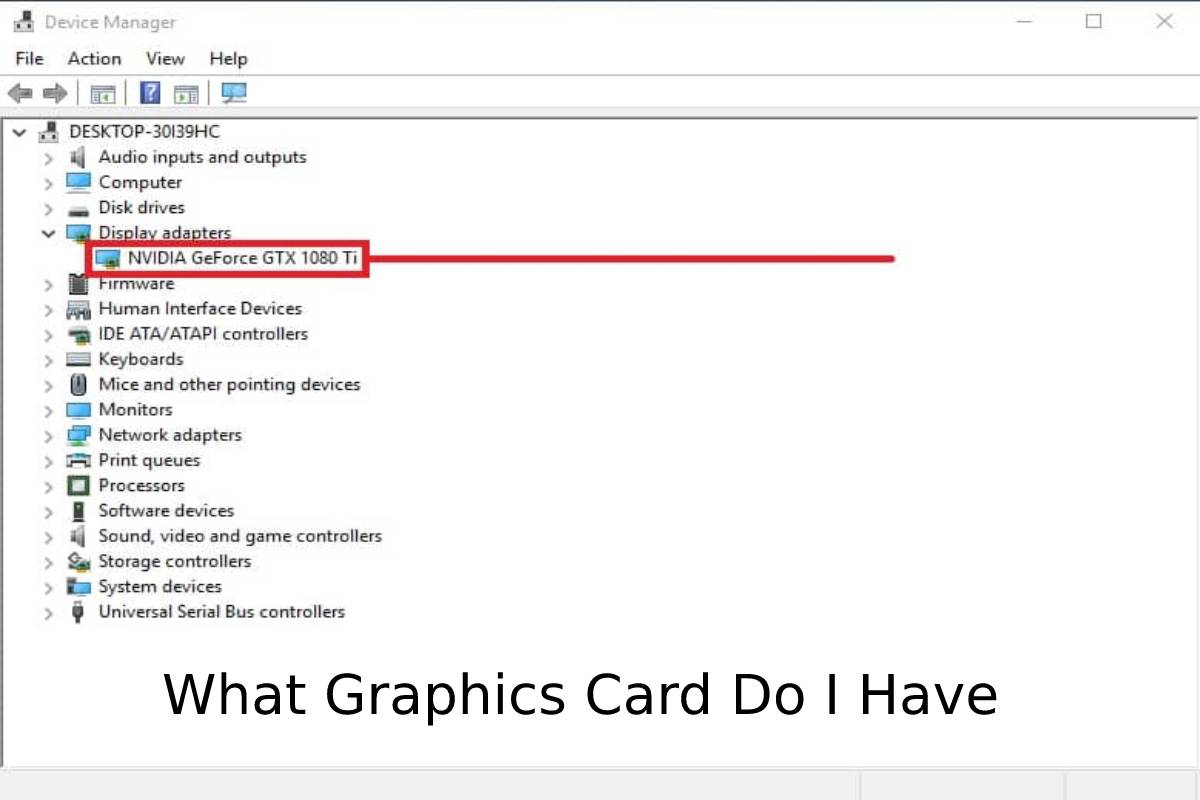
Windows Device Manager

  • We can also know our graph’s model if we open the Windows Device Manager.
  • There can be an option available through the Win + X menu in Windows 10.
  • Once there, we display the Display Adapters.
  • There we will find an entry that will show us the integrated graphics card model and another for the dedicated graphics card.
  • Check model in macOS.
  • On Mac, it is much simpler because you have to look for the computer model.
  • You have to know what graphics card it is. There is no possibility that you have assembled your own Mac by parts or that there is a lot of variety.
  • There are few models. You will save any step with an Internet search without having to open it without going to its settings or configuration.

Also Read:Instagram Message Desktop – Description, Application, Functions, and More